How I'd Automate a Barbershop
Regulars drift past their next cut when nobody reminds them, and you can't text them with clippers in your hand. Here's how this system works: a client books through your Cal.com page, and Make copies the booking into your Sheet. Every morning at 9:00, Make reads the Sheet and sends that day's texts through Twilio: a check-in to anyone who had a cut yesterday, two open times to anyone who asked about prices on your Tally form two days ago and didn't book, and your booking link to each regular whose service is due. Anyone already booked is skipped, only people who ticked the consent box get texts, and for your first week every text comes to your phone as a draft so you can check it before it goes to clients.
I haven't run a barbershop myself, so I can't promise you results. What I can give you is the exact steps.
What you'll need
Cost to start
- Google accountSheets holds your client list and your rules, and Calendar holds your bookingsFree
- Cal.comYour booking page, one link per serviceFree
- TallyA short "ask about prices or times" formFree
- MakeLogs every booking and sends the morning textsFree plan: 1,000 credits a month, 2 active scenarios
- TwilioThe phone number your texts come fromUS$1.15/mo for a US number, US$0.0083 per text segment (up to 160 characters) plus carrier fees, plus registration: one-time fees, then US$2/mo
- Time
- about two evenings, by my estimate, plus a few days waiting for your texting number to be approved. Start that first.
- Skill level
- if you can fill in a form and copy and paste, you can do this.
- Typical starting total
- about US$3 a month plus a one-time US$19.50 for a US number with US sole-proprietor registration, then about a cent per short text
- Typical starting total
- About US$3 a month plus a one-time US$19.50, then about a cent per short text
Tick each step off as you build it.
Tick each step off as you build it.
Step 1: How do I set up a front desk that works while I'm cutting?
Why it matters: your front desk here is a Google Sheet that knows your clients and your rules, plus a phone number that can text. Make reads the Sheet and does the sending, so nothing depends on you remembering.
Start with the Sheet:
- Go to sheets.google.com and open a blank spreadsheet.
- Name it after your shop, followed by Front desk (for example, Sharp Line Barbers Front desk).
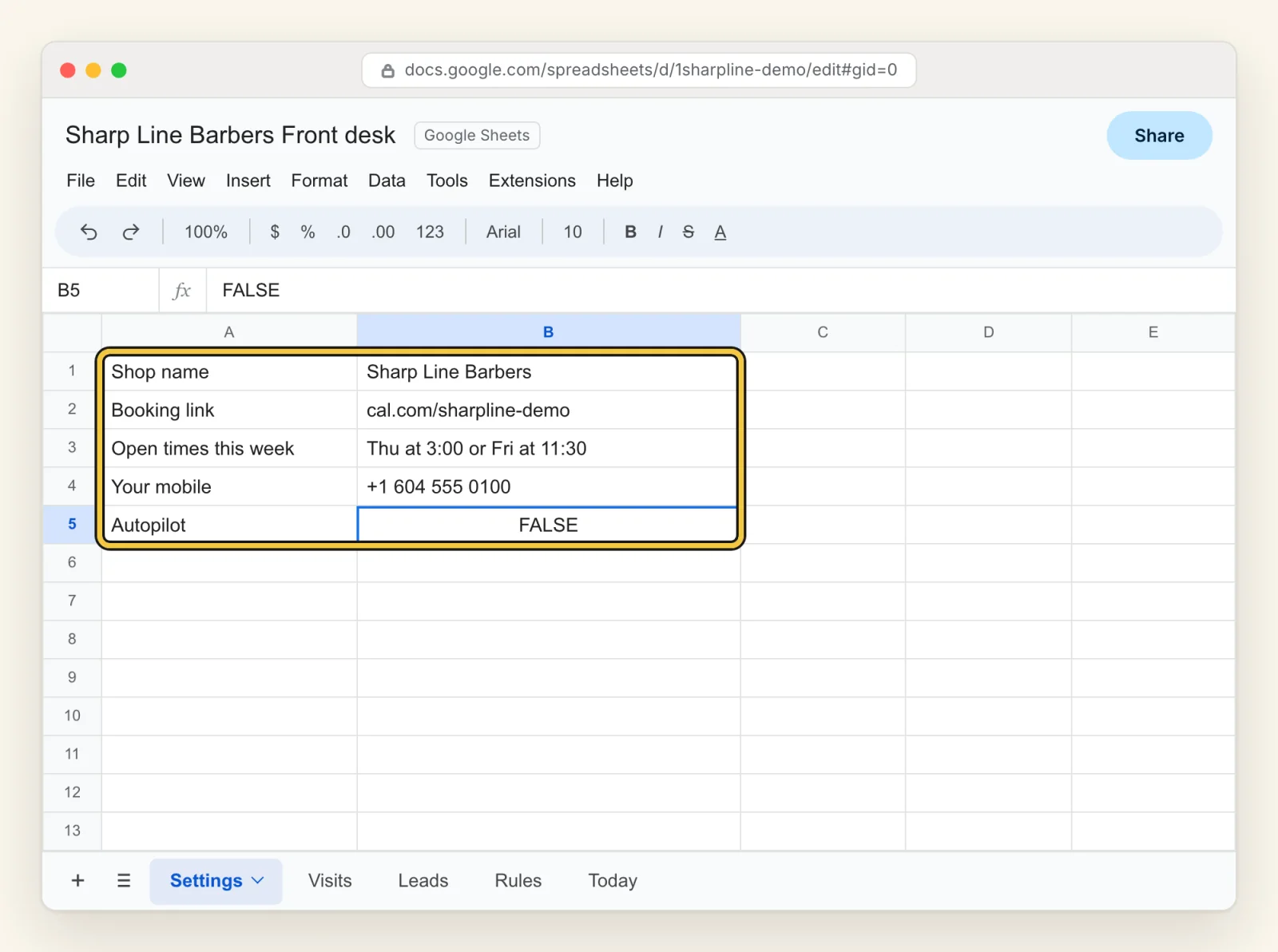
- Rename the first tab Settings and fill in A1 to B5 like the block below.
- Make four more tabs, named exactly Visits, Leads, Rules and Today. You'll fill them in as you go.
Copy-paste settings (column A, then your answer in column B)
Shop name	{{SHOP_NAME}}
Booking link	{{BOOKING_LINK}}
Open times this week	Thu at 3:00 or Fri at 11:30
Your mobile	{{YOUR_MOBILE}}
Autopilot	FALSE
Select the phone cells and choose Format → Number → Plain text, then type phone numbers with the country code, like +1 604 555 0100. Skip that and Sheets reads the + as the start of a formula. Leave Autopilot on FALSE for now. Step 6 explains it.
Then the phone number. Do this today, because it can't text anyone until it's registered:
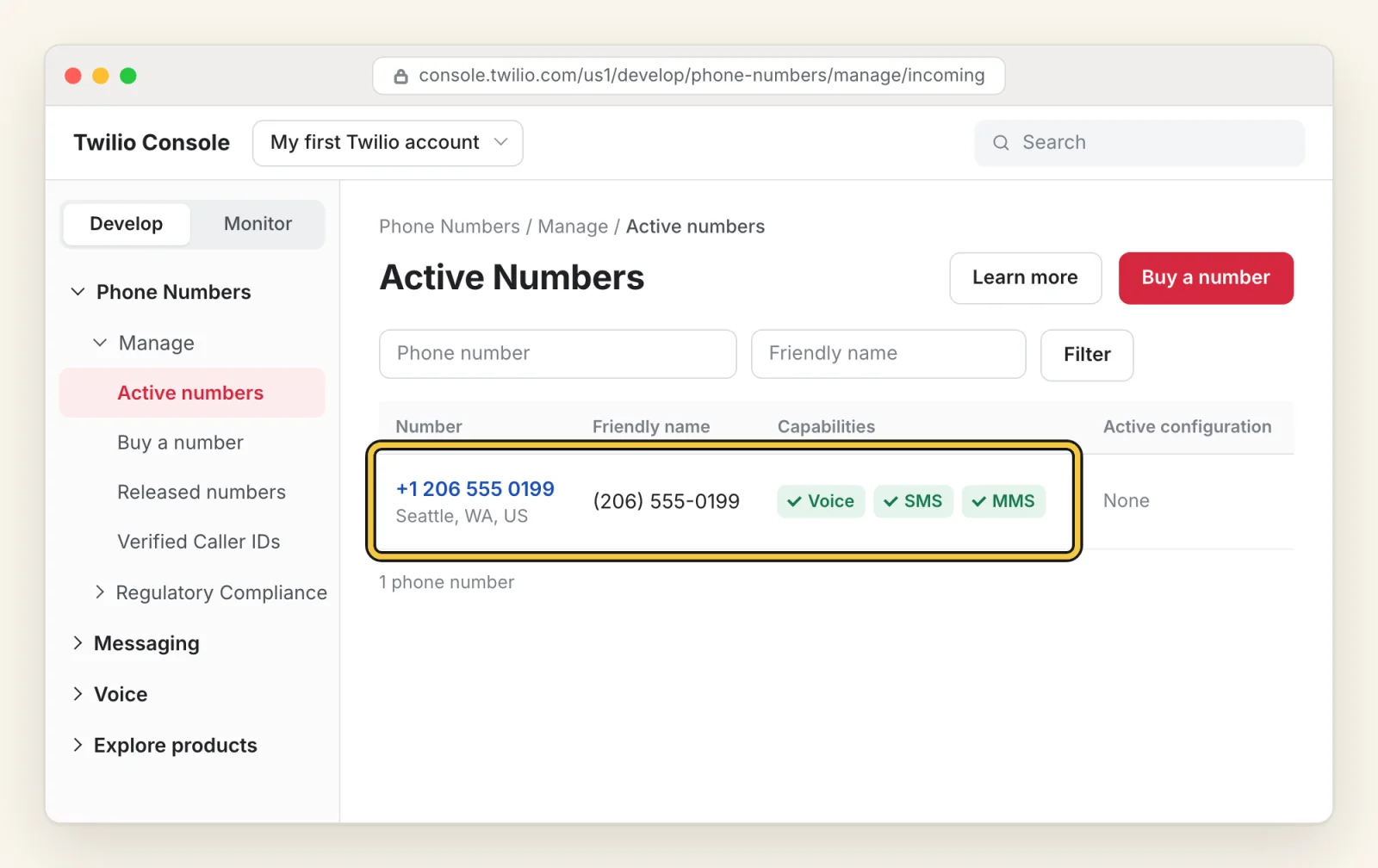
- Sign up at twilio.com and buy a local phone number.
- In the Twilio Console, complete the texting registration. In the US it's called A2P 10DLC. For a sole proprietor it's US$4.50 once, a US$15 review fee, and US$2 a month after that. When it asks how people opt in, describe the consent checkbox you'll add to your Cal.com booking page and Tally form in Steps 2 and 4. Carriers reject registrations without clear opt-in consent.
- Sign up for a free account at make.com while you wait.
Check it works: you have a Sheet with five tabs, a Twilio number on your account, and a Make login.
Do you have a Sheet with five tabs, a Twilio number on your account, and a Make login?
Step 2: How do I connect my booking page, client list and texts?
Why it matters: the rules only work if every booking lands in your Sheet with the client's name, phone, service and date. Cal.com takes the booking, and Make copies it into the Visits tab.
First, the booking page:
- Sign up free at cal.com with the same Google account and connect Google Calendar when it asks.
- Go to Availability and set the hours you cut.
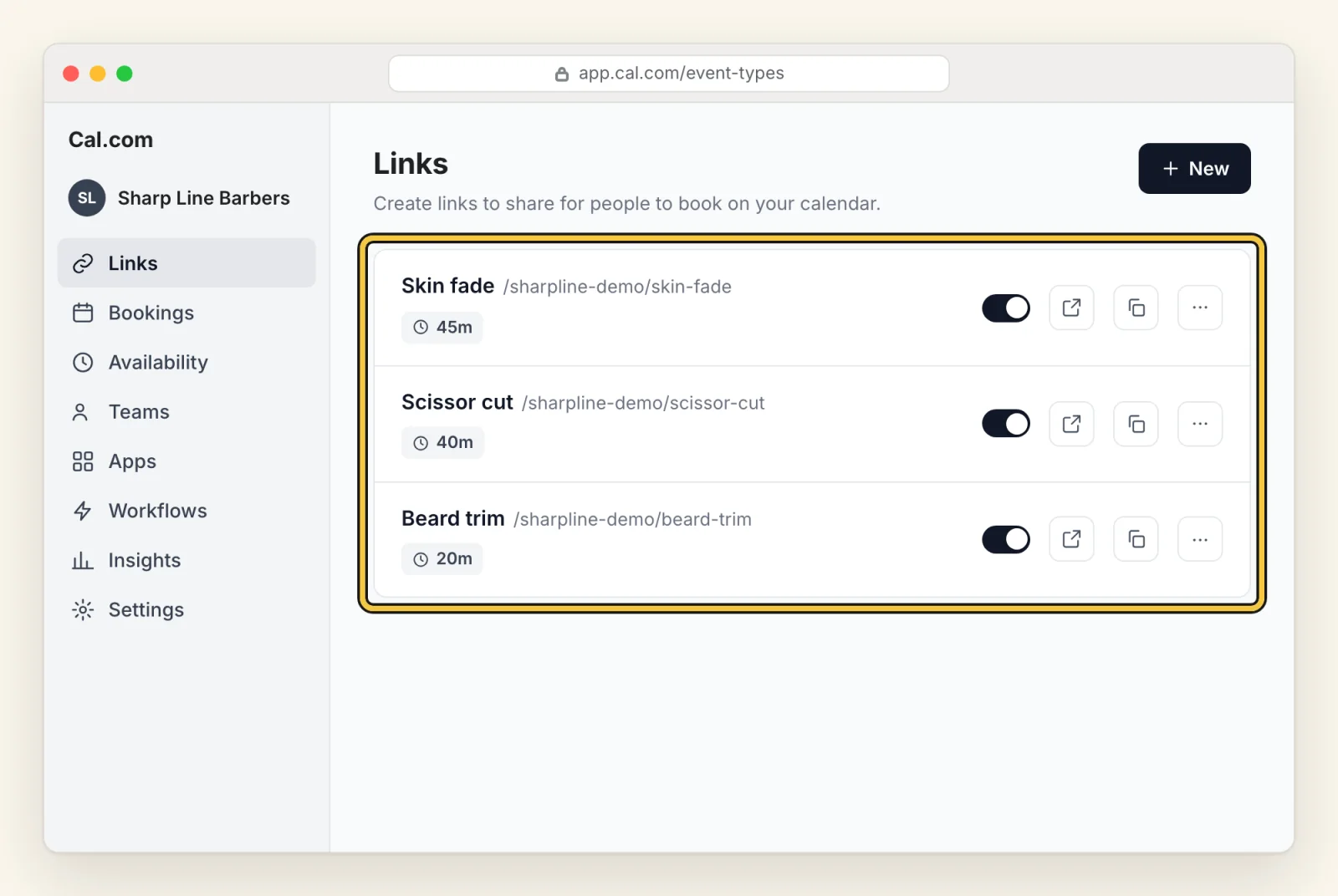
- Click Links in the sidebar (some accounts still call these Event types), then New, and make one link per service. Name them exactly like the block below, because your rules look them up by name.
- In each link's booking questions, turn on the phone number question and make it required. Then add an optional Checkbox question with this label, using your own shop's name: "I agree to get recurring appointment and rebooking texts from Sharp Line Barbers. Message frequency varies. Message and data rates may apply. Reply STOP to opt out. Reply HELP for help." Leave it optional, so people can book without agreeing to texts. Only people who tick it get texts.
Copy-paste link names
Skin fade
Scissor cut
Beard trim
Set each one's length to how long it really takes you.
Then the Visits tab:
- Paste these headers into A1 to F1 of Visits.
- Select column E and click Format → Number → Date.
Copy-paste headers
Client name Email Phone Service Visit date Text OK
Then connect Cal.com to the Sheet with Make. This is scenario 1:
- In Cal.com, go to Apps, install Make, and copy the API key it gives you.
- In Make, create a new scenario. Add Cal.com → Watch Booking Created, click Create a webhook, then Create a connection, and paste the key.
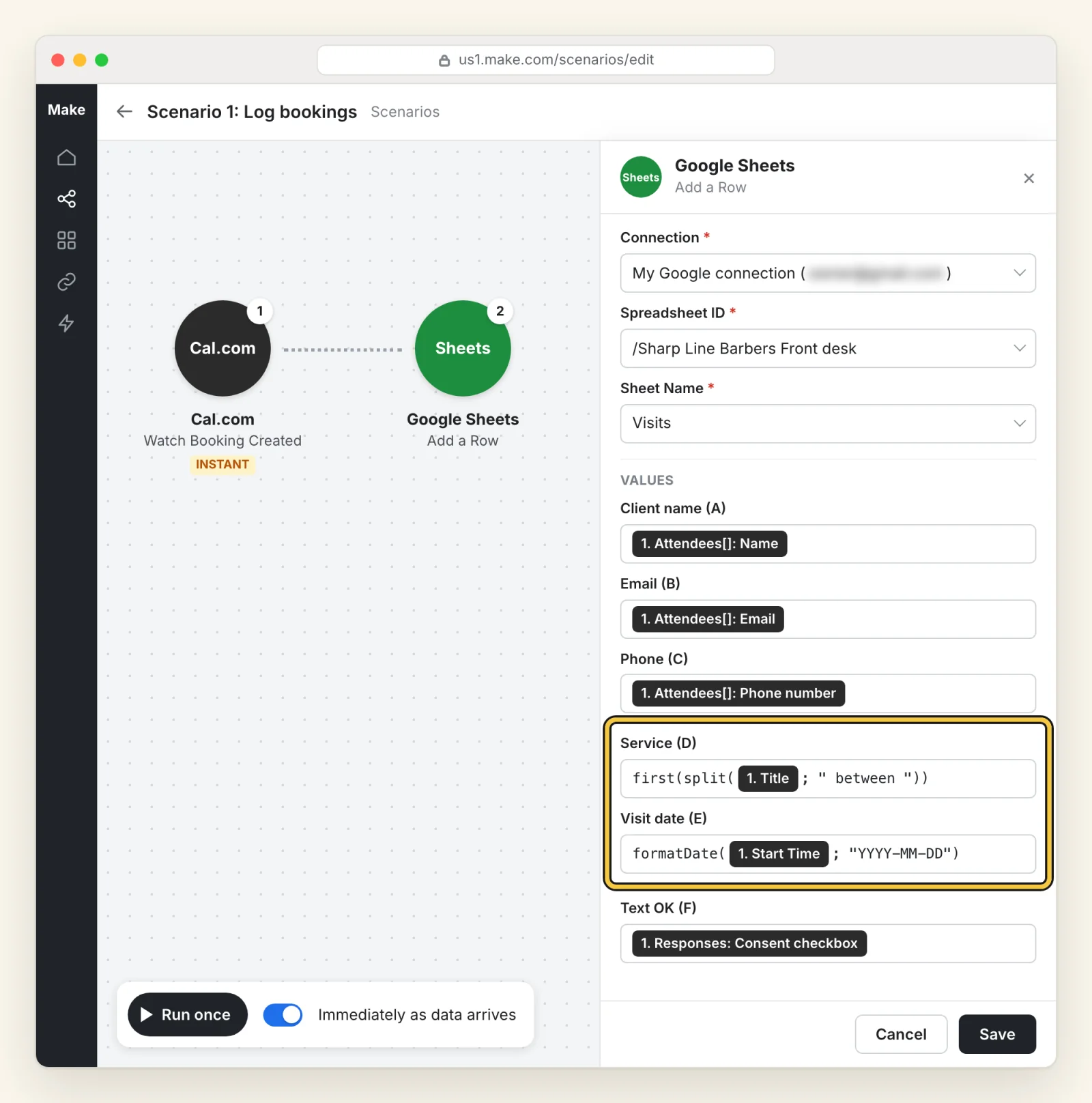
- Add Google Sheets → Add a Row, connect your Google account, and pick your Front desk spreadsheet and the Visits tab.
- Map the attendee's name, email and phone number from the booking into the first three columns. Map the consent checkbox into Text OK.
- In Service and Visit date, paste the two formulas below. Then swap TITLE for the booking's title and START_TIME for its start time by clicking them in the list.
- Click Save and switch the scenario on.
Copy-paste formulas (for Make)
Service:     {{first(split(TITLE; " between "))}}
Visit date:  {{formatDate(START_TIME; "YYYY-MM-DD")}}
Cal.com titles bookings like "Skin fade between you and Test Client", so the first formula keeps just "Skin fade". The second turns the start time into your local date. Make uses your organization's time zone for this (Profile → Time zone options), so check that it's yours.
From now on, Visits is your client list: who came in, for what, and when.
Check it works: book yourself on your Cal.com page as "Test Client" with your own mobile, and tick the consent box. Within a minute a row appears in Visits with "Skin fade" (or whichever you picked), the appointment's date, and TRUE under Text OK. Book again without ticking it: the row still appears, but Text OK is empty or FALSE, and that booking won't get texts.
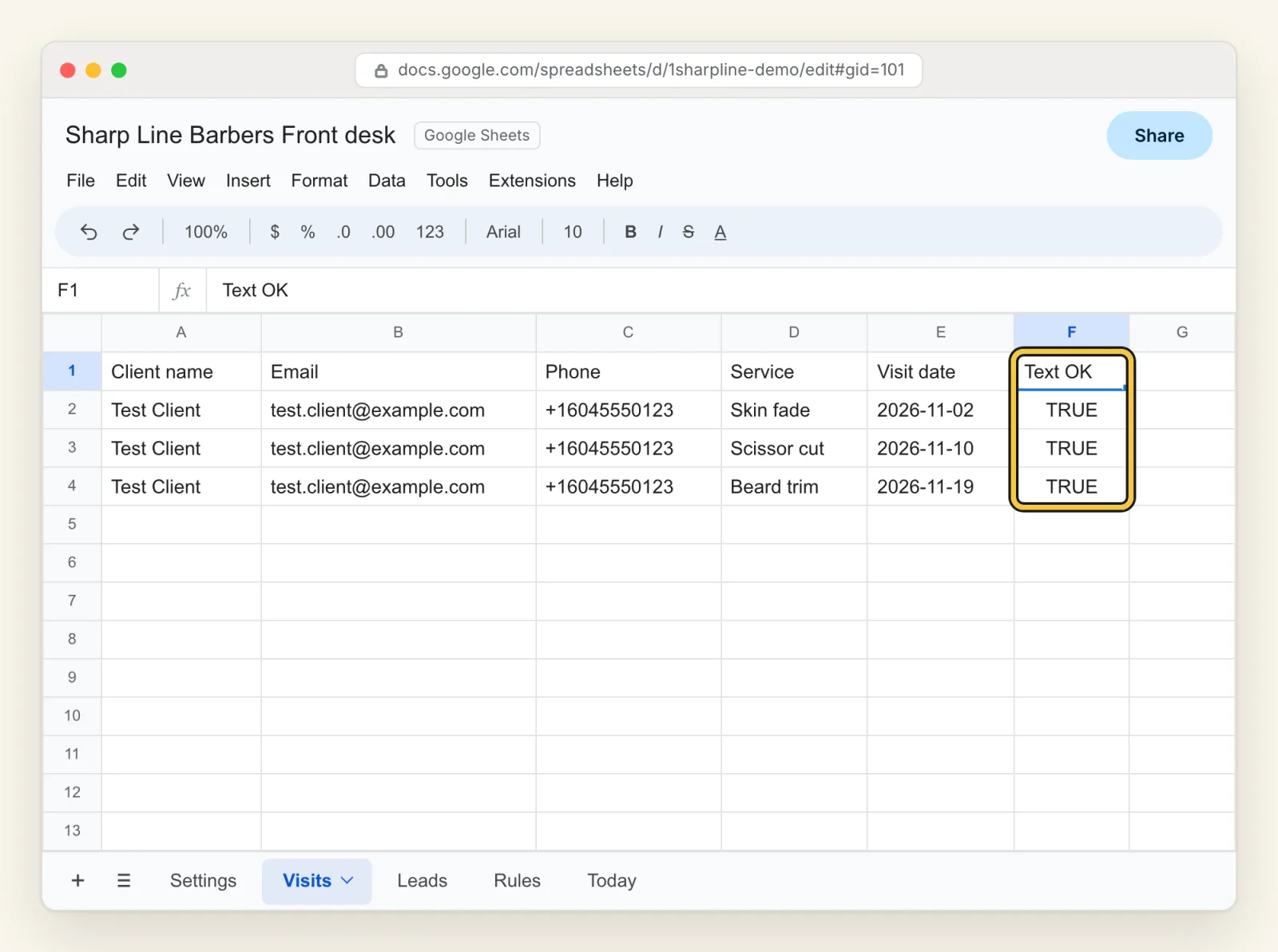
Does a Test Client booking show up in Visits within a minute, with TRUE under Text OK?
Step 3: How do I send a quick check-in text the day after every cut?
Why it matters: a short "how's the cut sitting?" the next day reminds people you care about the work, and it keeps your number at the top of their texts.
All your rules live in one formula on the Today tab. It builds today's list of texts: check-ins, price follow-ups and rebook reminders. Make sends whatever is on that list. Each rule only matches one exact day and nothing keeps track of what was sent, so if a morning run fails or you skip a draft, that text doesn't go out later.
- Click cell A1 on the Today tab.
- Paste the whole formula below and press Enter.
- Click File → Settings, open the Calculation tab, and set Recalculation to On change and every hour. That keeps "today" fresh when Make reads the Sheet in the morning. While you're in Settings, check that Time zone on the General tab is your shop's, because "today" follows it.
Copy-paste formula (Today!A1)
=ARRAYFORMULA(LET(
shop, Settings!B1, link, Settings!B2, times, Settings!B3, me, "+"®EXREPLACE(Settings!B4&"", "[^0-9]", ""), auto, Settings!B5=TRUE,
n, Visits!A2:A, e, Visits!B2:B, p, "+"®EXREPLACE(Visits!C2:C&"", "[^0-9]", ""), s, Visits!D2:D, d, Visits!E2:E, ok, UPPER(TRIM(Visits!F2:F&""))="TRUE",
blank, HSTACK("", "", ""),
hi, "Hey "&IFERROR(REGEXEXTRACT(n&"", "^\S+"), n)&", it's "&shop&". ",
ahead, IF(n="", FALSE, COUNTIFS(e, e, d, ">"&d) > 0),
due, d + IFERROR(VLOOKUP(s, Rules!A2:B, 2, FALSE), 28),
checkin, IFERROR(UNIQUE(FILTER(HSTACK(n, p, hi&"How's the cut sitting? Reply STOP to opt out."), n<>"", d=TODAY()-1, ok)), blank),
rebook, IFERROR(FILTER(HSTACK(n, p, hi&"You're about due for your next "&LOWER(s)&". Grab a spot: "&link&" Reply STOP to opt out."), n<>"", due=TODAY(), NOT(ahead), ok)), blank),
lead, IFERROR(LET(
h, Leads!A1:Z1, L, Leads!A2:Z,
ln, CHOOSECOLS(L, MATCH("Name", h, 0)), lp, "+"®EXREPLACE(CHOOSECOLS(L, MATCH("Phone", h, 0))&"", "[^0-9]", ""),
le, CHOOSECOLS(L, MATCH("Email", h, 0)), lt, CHOOSECOLS(L, MATCH("Submitted at", h, 0)), lok, UPPER(TRIM(CHOOSECOLS(L, MATCH("Text OK", h, 0))&""))="TRUE",
ld, IFERROR(DATEVALUE(LEFT(lt&"", 10)), INT(lt)),
booked, IF(ln="", FALSE, COUNTIFS(e, le, d, ">="&ld) > 0),
FILTER(HSTACK(ln, lp, "Hey "&IFERROR(REGEXEXTRACT(ln&"", "^\S+"), ln)&", it's "&shop&". Still need a cut? I've got "×&". Book here: "&link&" Reply STOP to opt out."), ln<>"", ld=TODAY()-2, NOT(booked), lok)
), blank),
all, VSTACK(checkin, rebook, lead),
keep, FILTER(all, CHOOSECOLS(all, 1)<>""),
out, IFERROR(HSTACK(CHOOSECOLS(keep, 1), IF(CHOOSECOLS(keep, 1)<>"", IF(auto, CHOOSECOLS(keep, 2), me)), IF(auto, "", "DRAFT for "&CHOOSECOLS(keep, 1)&" "&CHOOSECOLS(keep, 2)&": ")&CHOOSECOLS(keep, 3)), blank),
VSTACK({"Client", "Send to", "Text"}, out)
))You don't need to understand it. Want different wording? Change only the message words inside the quote marks, like "How's the cut sitting?", and leave everything else alone, including "Name", "Phone", "Email", "Submitted at", "Client", "Send to", "Text" and "DRAFT for".
Check it works: change one Test Client row's date in Visits to yesterday. A check-in row should appear on Today for Test Client, starting with "DRAFT for" and sending to your own mobile.
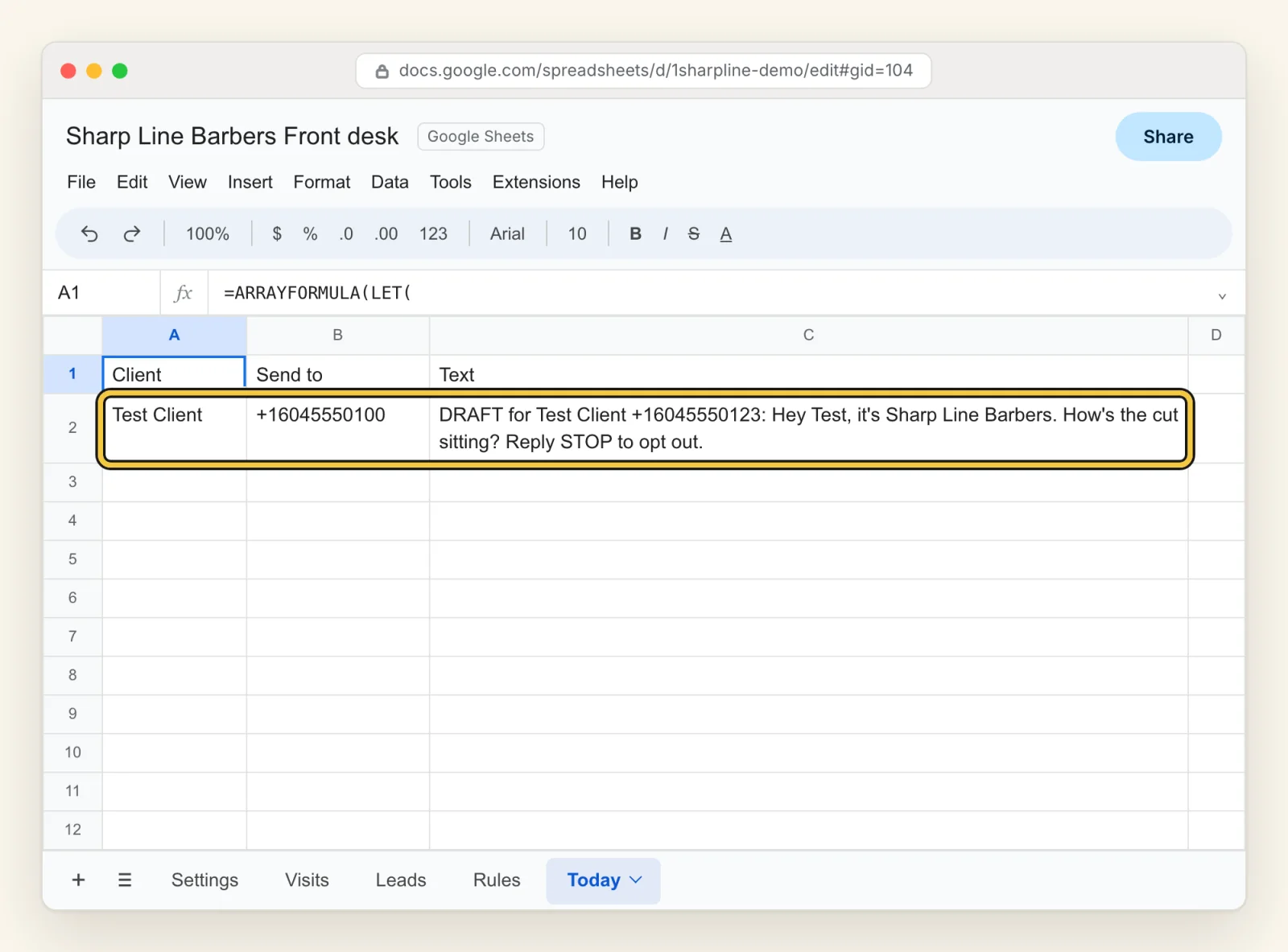
Does a check-in row starting with DRAFT for appear on Today for Test Client?
Step 4: How do I follow up with people who asked about prices but didn't book?
Why it matters: "how much for a fade?" is someone who already wants a cut. If they don't book within two days, a text offering two real times usually beats waiting for them to remember.
Build the form:
- Sign up free at tally.so and click Create form. Title it with your shop's name, like Ask Sharp Line Barbers about prices or times.
- Type / to add four questions, titled exactly Name, Phone, Email and What can I help with?. Use the phone number block for Phone and the email block for Email. Then add a Checkbox block with the same consent line as your Cal.com booking question in Step 2.
- Make the first three required, and leave the checkbox optional, then click Publish.
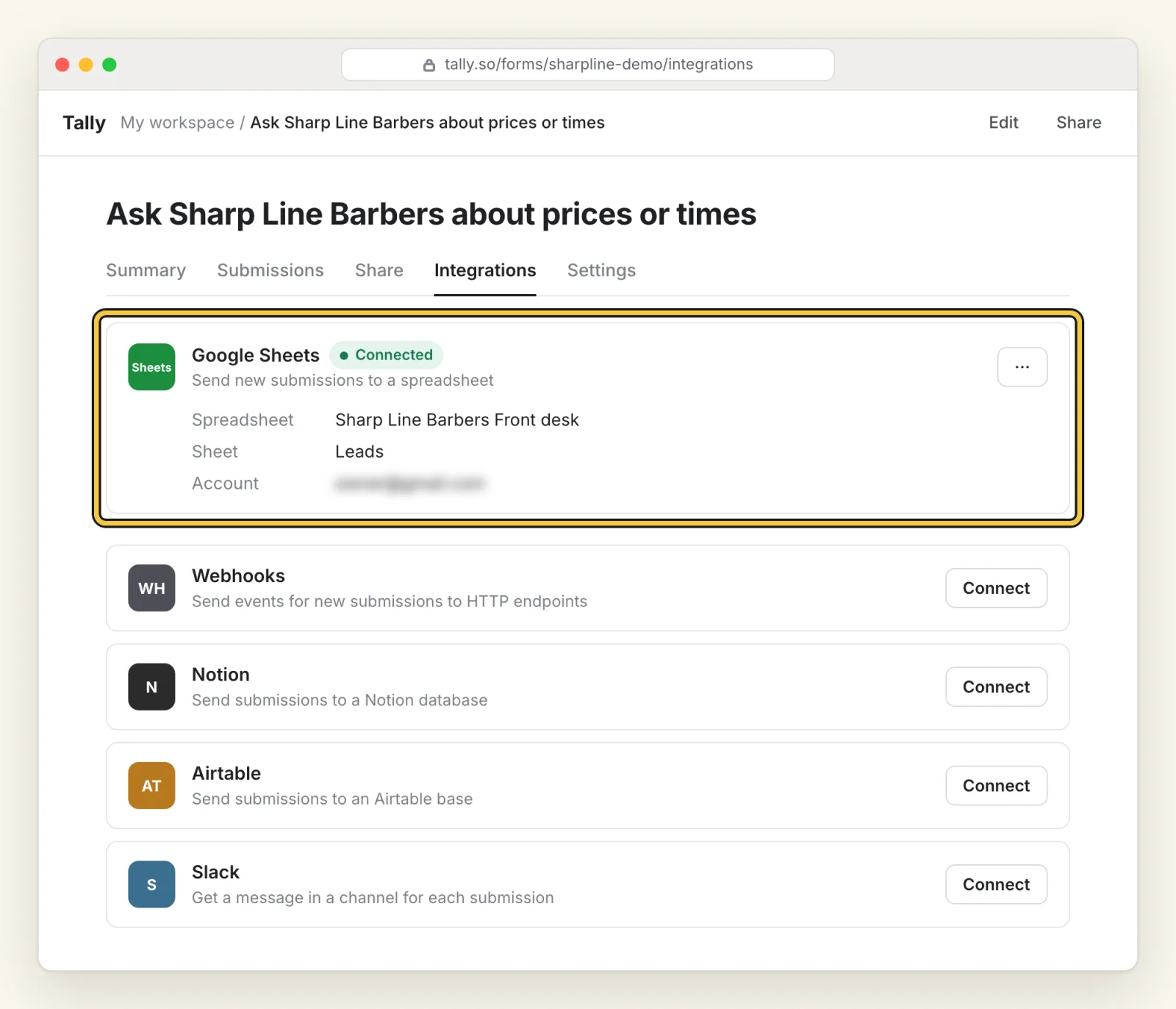
- Open the Integrations tab, click Connect next to Google Sheets, choose your Front desk spreadsheet and the Leads tab, and click Save changes. If the consent column in Leads used the long checkbox label as its header, rename that header to Text OK.
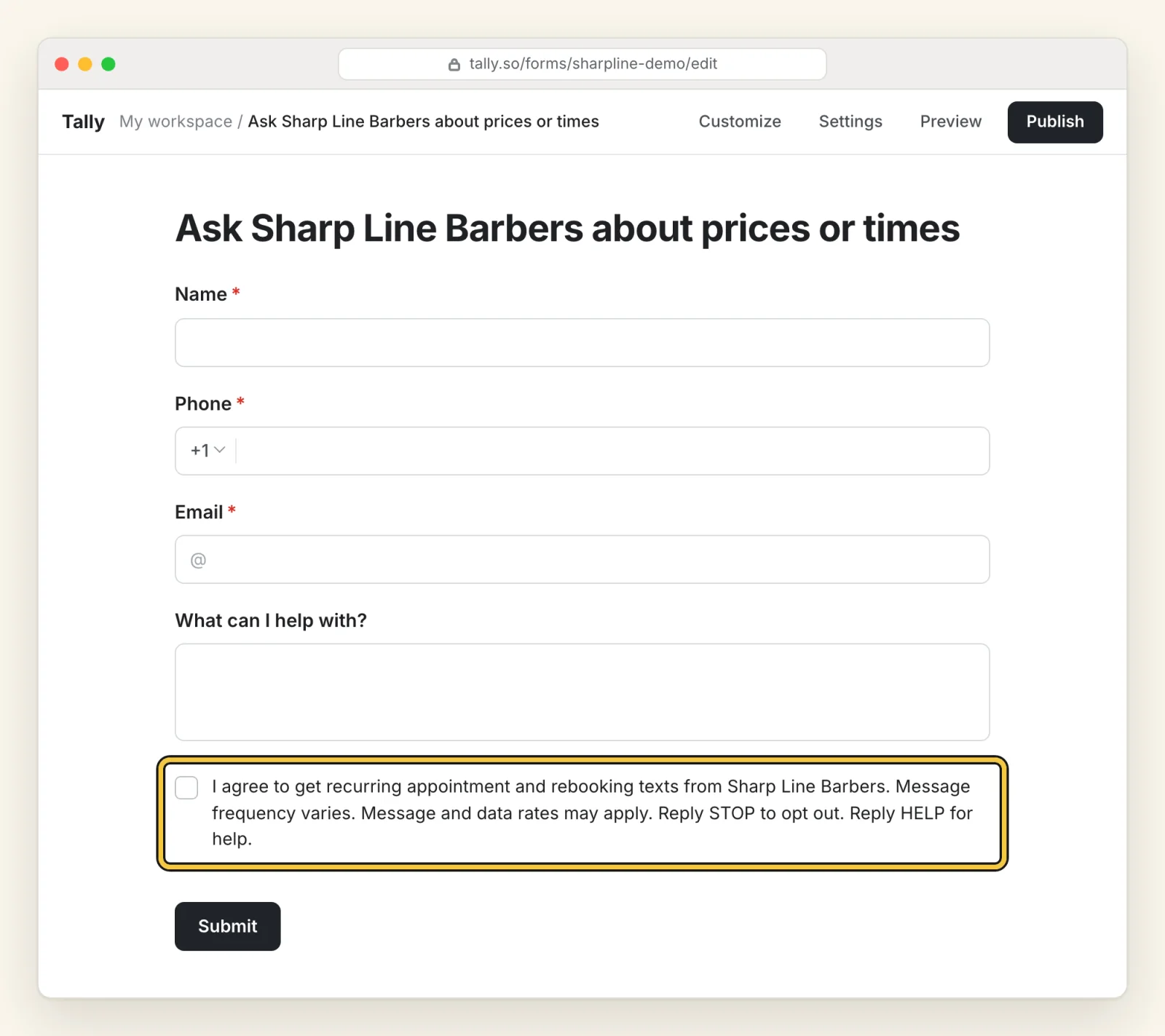
Put the form link in your Instagram bio and your Google Business Profile, and send it when someone asks about prices by text. If someone asks you in person, have them fill in the form on your phone so they get a Submitted at date, and so they can tick the consent box if they want texts.
Every Monday, and again whenever one of them gets booked or passes, update Open times this week in Settings with two times you actually have free. That's what the follow-up offers.
Copy-paste follow-up (already in the formula)
Hey {{FIRST_NAME}}, it's {{SHOP_NAME}}. Still need a cut? I've got Thu at 3:00 or Fri at 11:30. Book here: {{BOOKING_LINK}} Reply STOP to opt out.Check it works: fill in the form as "Test Client" with a new email, and tick the consent box. In Leads, confirm Text OK is TRUE, then change the Submitted at date to two days ago. A follow-up row appears on Today. Book with that same email and it disappears. A submission with the box left unticked shouldn't appear on Today.
Does a follow-up row appear on Today, then disappear once you book with the same email?
Step 5: How do I check every morning who's due for their next cut?
Why it matters: this is the step that actually pays you. A skin fade grows out faster than a scissor cut, so each service gets its own timer, and the reminder lands right when they're thinking about it.
Set the timers:
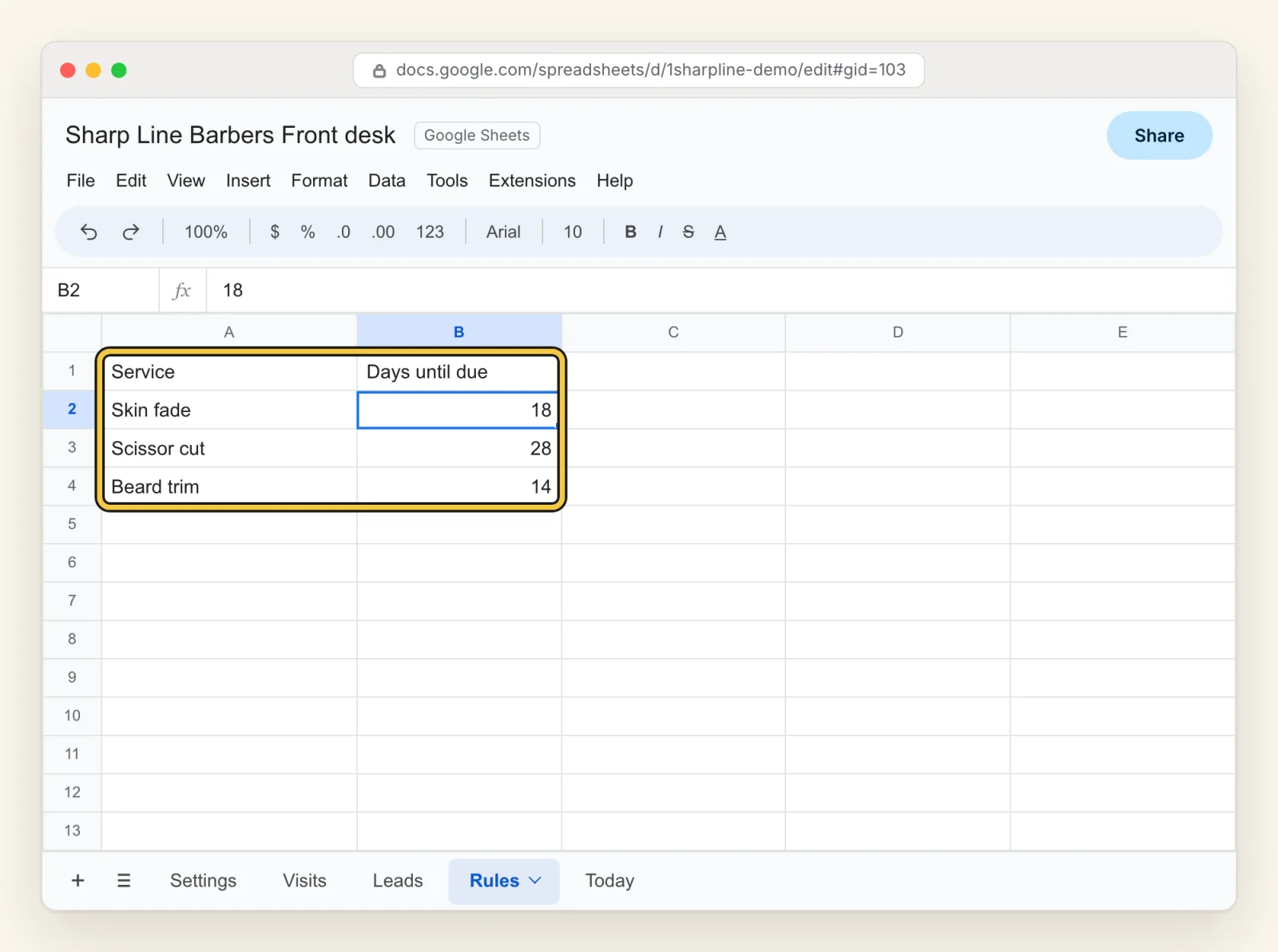
- On the Rules tab, paste the block below into A1.
- Change the days to match your clients. Any service not on the list gets 28 days.
Copy-paste rules
Service	Days until due
Skin fade	18
Scissor cut	28
Beard trim	14
Then the morning run in Make. This is scenario 2:
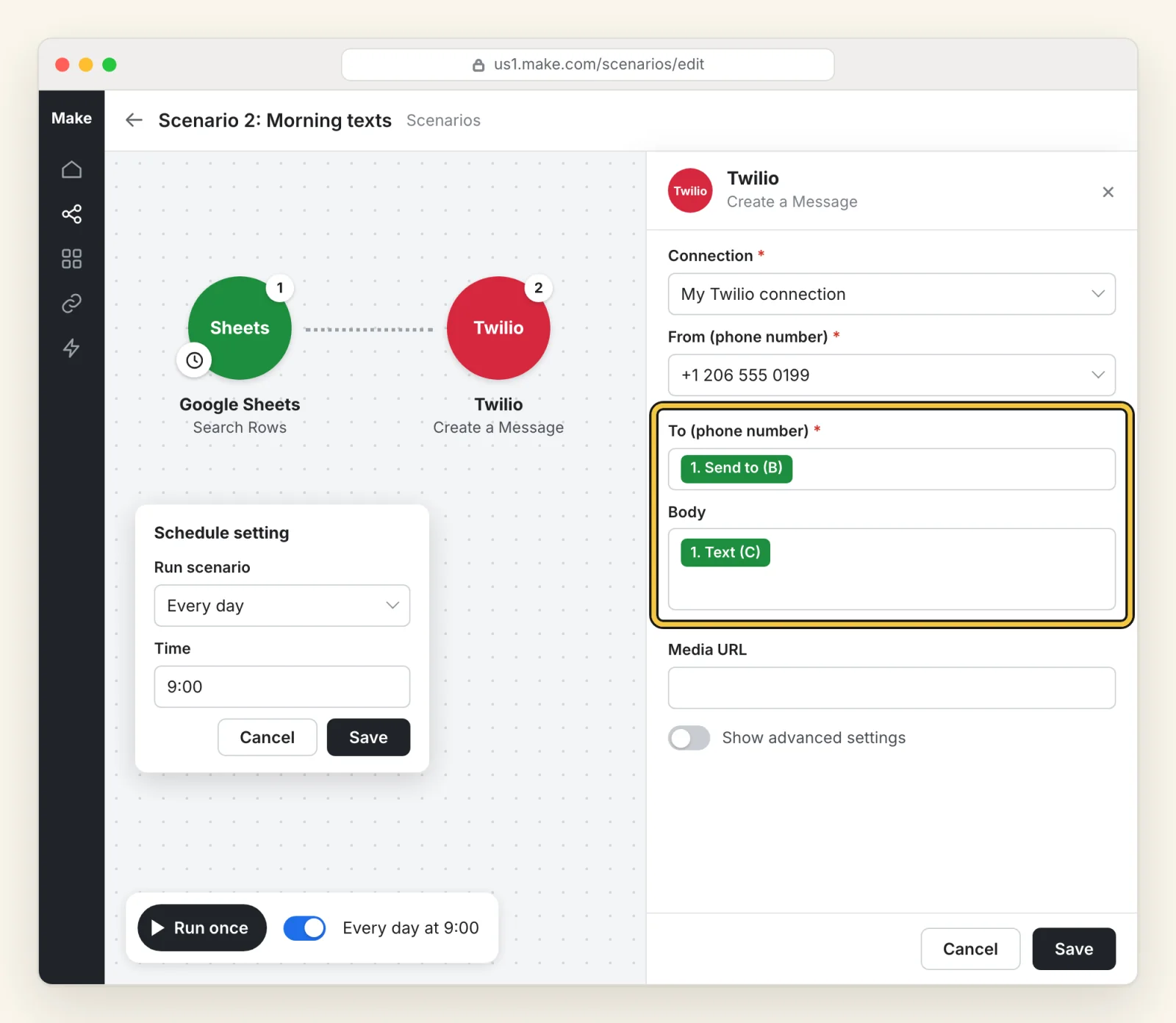
- Create another scenario and add Google Sheets → Search Rows. Pick the Today tab, and filter to rows where Send to isn't empty.
- Add Twilio → Create a Message and connect it with the Account SID and Auth Token from your Twilio Console.
- Set From to your Twilio number, To to the Send to column and Body to the Text column.
- Click the clock on the first module and schedule it for every day at 9:00.
- Click Save and switch it on.
By my math a solo barber uses most of Make's 1,000 free credits with the two scenarios: about 2 credits per booking logged, plus 1 each morning and 1 per text sent. If you outgrow it, Make's Core plan starts at US$9 a month for 10,000 credits.
Check it works: in Visits, delete the other Test Client rows, then set the Skin fade row to 18 days ago with your mobile and TRUE in Text OK. Click Run once on scenario 2. A text from your Twilio number should reach your phone.
Does a text from your Twilio number reach your phone when you run scenario 2 once?
Step 6: How do I skip people who are already booked and check every text first?
Why it matters: nothing annoys a regular like a "you're due" text for the cut they booked yesterday. And until you've seen a week of these, you should read every one before it goes out.
Skipping is built in. If a client has a later booking in Visits, the formula leaves them off the rebook list, matching by email.
Checking first is the Autopilot switch in Settings:
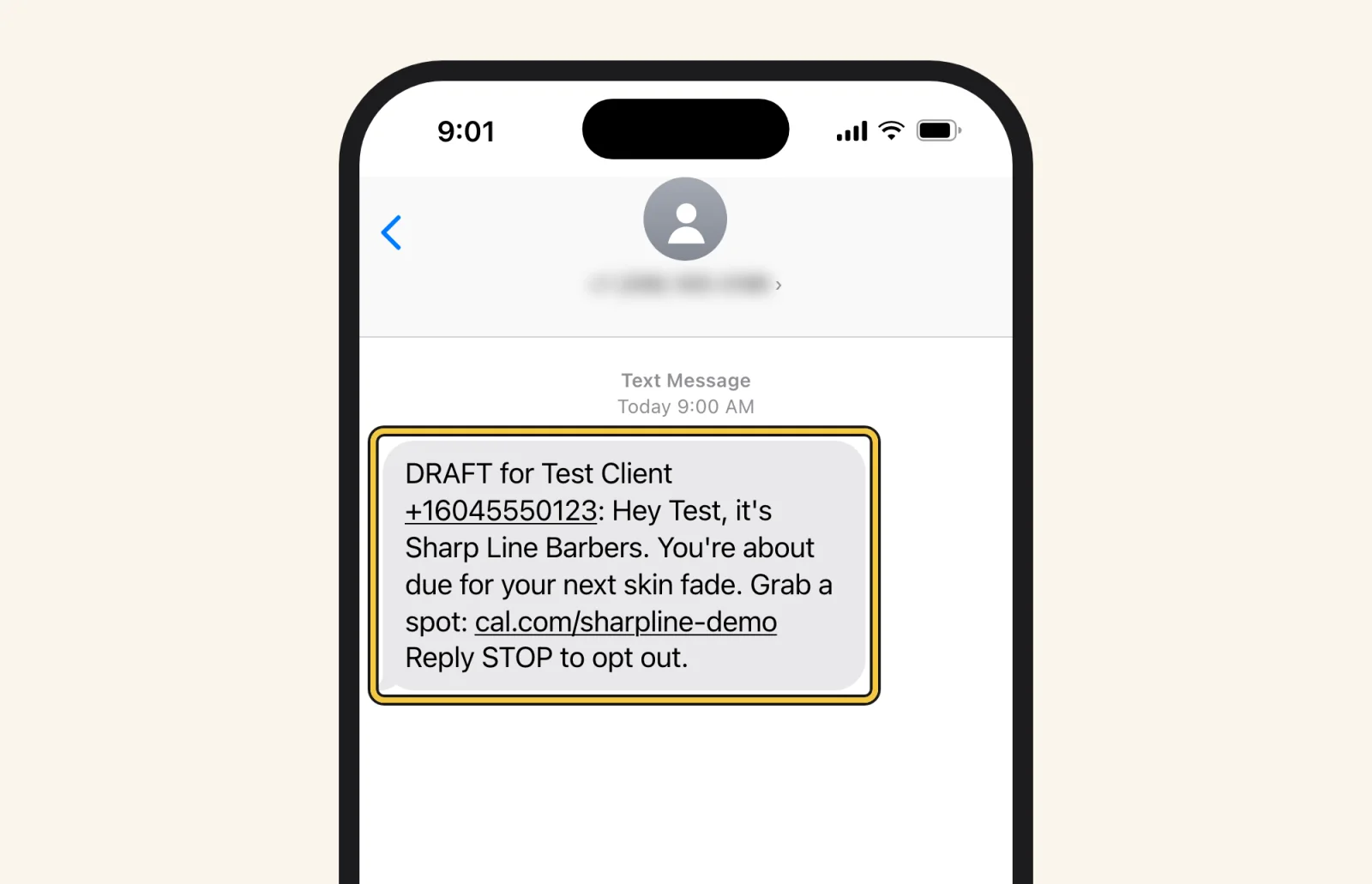
- Leave Autopilot on FALSE for your first week. Every text comes to your mobile instead, starting "DRAFT for", with the client's name and number.
- Read each one. If it's good, copy the text after the colon and send it yourself to the number shown. If the wording is off, fix it in the formula.
- When a week of drafts looks right, change Autopilot to TRUE. From the next morning, texts go straight to clients.
Check it works: give Test Client a booking in Visits dated next week. Their rebook row should vanish from Today. Delete the test rows when you're done.
Does Test Client's rebook row vanish from Today once they have a booking next week?
Would rather an app did it all for you?
If you'd rather not wire tools together, there are apps that do most of this behind one login.
An AI assistant like Grok Bot can follow the same rules in plain English, working off your bookings in Square or Booksy. Booksy is US$29.99 a month plus tax for one person, plus US$20 a month for each extra team member, and includes free appointment confirmations and reminders, plus 2,000 marketing texts a month. Squire's Independent plan for solo barbers showed CA$45 a month when I checked, with automated email and text reminders. Ask Booksy or Squire whether their rebook texts can be timed per service before you sign up.
| Build it yourself | All-in-one app | |
|---|---|---|
| Monthly cost | About US$3, plus a cent or so per text | Booksy from US$29.99 |
| Logins | Five (Google, Cal.com, Tally, Make, Twilio) | One |
| Rebook timer per service | Yes, in your Rules tab | Ask the app |
Swipe sideways to see the whole chart.
If you're solo and like knowing how it works, I'd build it yourself. With a few chairs and staff, I'd look at the apps first.
Common mistakes and how to fix them
- No texts arrive. Twilio hasn't approved your registration yet, scenario 2 is switched off, or Autopilot is FALSE and you're looking at the client's phone instead of yours.
- The same person got a rebook text after booking. They booked with a different email. Fix the email in Visits so both rows match.
- Someone who cancelled or rescheduled got a text on the wrong day. Scenario 1 only logs new bookings, so delete the row in Visits when someone cancels or doesn't show, and change the date in Visits when someone reschedules.
- Today is always empty. Column E in Visits isn't formatted as a date. (A Cal.com link name that doesn't match Rules won't empty it; that service just gets 28 days.) Or nobody due today has TRUE in Text OK, so the formula is correctly leaving them off.
- A client who booked never got a text. Text OK isn't TRUE on their row, which means they didn't tick the consent box. That's working as designed.
- Texts show yesterday's list. Recalculation is still set to On change. Switch it to On change and every hour.
What it costs
| Item | Cost |
|---|---|
| Google Sheets and Calendar | Free with a Google account |
| Cal.com | Free for one person |
| Tally | Free, including the Google Sheets connection |
| Make | Free plan: 1,000 credits a month, 2 active scenarios. Core from US$9 a month for 10,000 credits |
| Twilio number | US$1.15/mo for a US local number |
| Twilio texts | US$0.0083 per text segment (up to 160 characters), plus carrier fees of up to half a cent |
| Twilio registration (US, sole proprietor) | US$4.50 once, US$15 review fee, then US$2/mo |
| Typical starting total | About US$3 a month plus a one-time US$19.50, then about a cent per short text |
By my math, 300 short texts a month adds about US$4. A text over 160 characters, like a draft with its "DRAFT for" line in front, counts as two segments and costs about double. US-dollar prices cost more on a Canadian card.
Smiles,
Brett
FAQ
Is it legal to text clients automatically?
Yes, with permission. In Canada, CASL treats "time for your next cut" texts as promotional, so you need consent (a purchase in the last two years counts as implied consent), your business name and a way to opt out. In the US, the FCC requires prior express written consent for marketing texts sent with an autodialer, and it says consent to texts can't be a condition of purchase, so the checkbox on your booking page and price form is optional: people can book or ask about prices without ticking it, and only people who tick it get texts. Twilio's registration checks how people opted in. Every text in this guide ends with "Reply STOP to opt out". This isn't legal advice.
How often should barbers remind clients to rebook?
I'd start with 18 days for a skin fade, 28 for a scissor cut and 14 for a beard trim, then adjust in your Rules tab once you see when your regulars actually come back.
Can I keep using Square or Booksy for bookings?
You can, but this build is easiest with Cal.com because Make connects to it with a few clicks. Make's Square connection has no booking trigger, so bookings would have to be added to Visits another way.
Do I need Make at all?
Make does the copying and the sending. Without it, you'd type each booking into Visits yourself, then open Today each morning and send the texts yourself, which still beats remembering who's due.