How I'd Automate a Dog Grooming Business
Most of the texting in a grooming shop is the same few jobs: booking, chasing vaccine records, reminders and rebooking. Here's how this system works: a new client fills in a Tally form with their dog's details, a vaccine photo and a signed waiver, which sends them straight to your Cal.com booking page. They pick a time block sized for their dog and leave a deposit or card on file through Stripe, and you confirm once the form is in. Cal.com then texts the confirmation and reminders 72 and 24 hours before, and a phone shortcut sends the "ready for pickup" text. At checkout you book their next visit about six weeks out, and for anyone who doesn't, Make logs every booking in your Sheet and, six weeks later, texts a rebook link to clients who agreed to get texts.
I haven't run a grooming shop myself, so I can't promise you results. What I can give you is the exact steps.
What you'll need
Cost to start
- Google accountSheets for your client list, Calendar for bookingsFree
- Cal.comBooking page, time blocks, deposits and reminder textsFree; texts use credits you buy (a credit is 1 US cent, and a text takes about 1.5 to 2.5 credits, by my math)
- StripeTakes the deposit or saves the card, inside Cal.com2.9% + 30¢ per US card payment (2.9% + CA$0.30 in Canada)
- TallyIntake form, vaccine photo and waiver signatureFree
- MakeLogs bookings and sends the six-week rebook textFree plan: 1,000 credits a month, 2 active scenarios
- TwilioThe number Make texts fromUS$1.15/mo for a US number, about a cent per text, plus registration
- Your phoneVoicemail greeting and the pickup textFree
- Time
- about a week, by my estimate. One step a day, on a computer.
- Skill level
- if you can fill in a form and copy and paste, you can do this.
- Typical starting total
- about US$3 a month plus a one-time US$19.50 as a US sole proprietor, then card fees and a few cents per text
- Typical starting total
- About US$3 a month plus a one-time US$19.50 as a US sole proprietor, then card fees and a few cents per text
Tick each step off as you build it.
Tick each step off as you build it.
Step 1: How do I put my clients, pets and calendar in one place?
Why it matters: every other step reads from this. A notebook can't text or rebook anyone for you.
Start with your client list:
- Go to sheets.google.com and open a blank spreadsheet.
- Name it after your shop, followed by Clients & pets (for example, Paws & Suds Clients & pets).
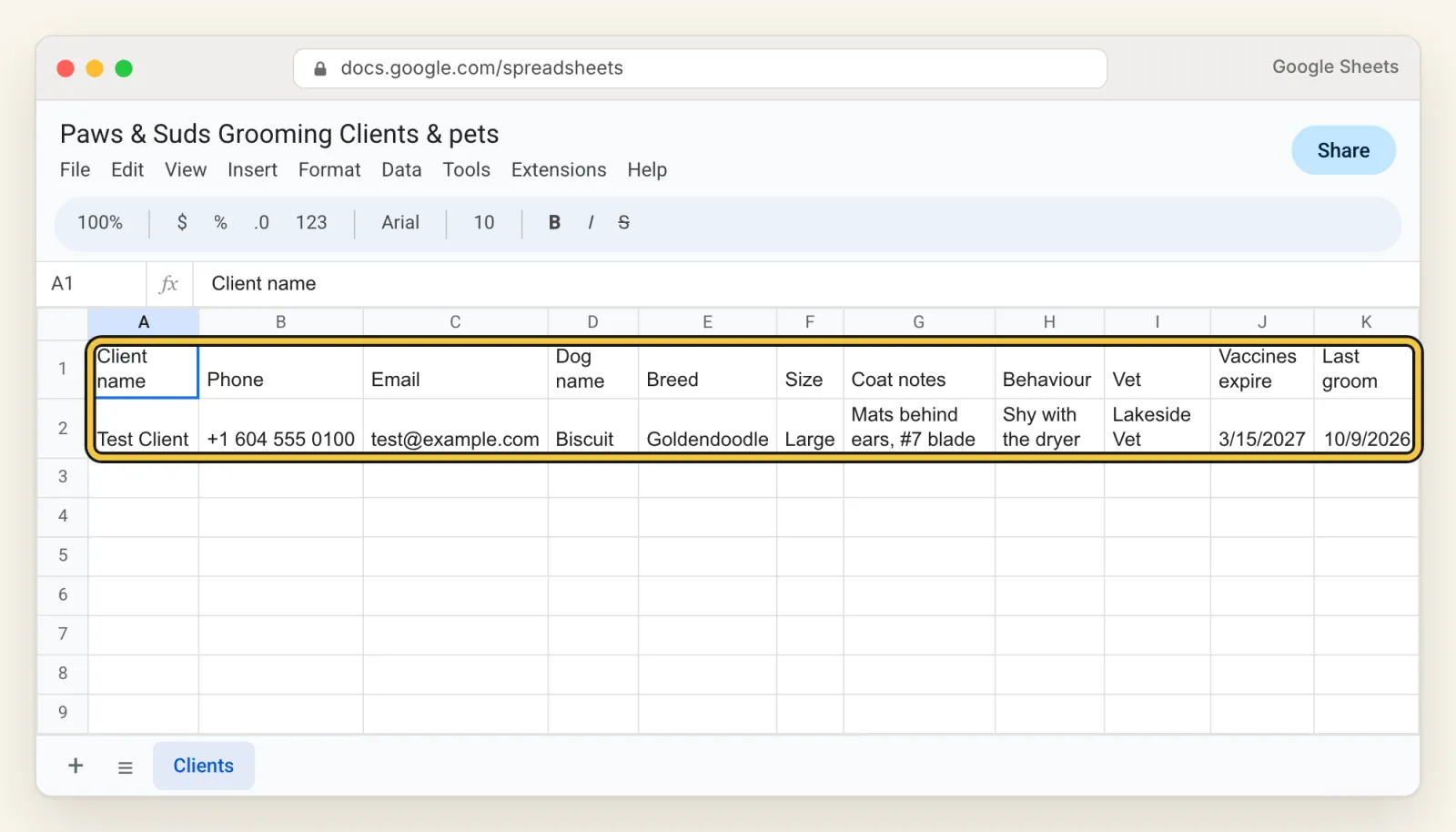
- Rename the first tab Clients and paste these headers into row 1.
- Copy in your current clients, one row per dog. Delete old clients, wrong numbers and pets that have passed.
- Select the phone column and choose Format → Number → Plain text, then type phone numbers with the country code, like +1 604 555 0100. Skip that and Sheets reads the + as the start of a formula.
Copy-paste headers
Client name Phone Email Dog name Breed Size Coat notes Behaviour Vet Vaccines expire Last groom
Then your calendar:
- Sign up for a free account at cal.com using the same Google account.
- When it asks you to connect a calendar, choose Google Calendar. Every booking lands there.
- Go to Availability and set the days and hours you groom.
Check it works: add an event to Google Calendar for tomorrow at 10:00. Your Cal.com page, opened in a private window, shouldn't offer that time.
Does your Cal.com page, in a private window, skip the 10:00 event you added to Google Calendar?
Step 2: How do I give every breed and size its own time block?
Why it matters: a bath on a small terrier and a full groom on a matted doodle are not the same hour. In Cal.com each kind of appointment gets its own booking link and length, so a three-hour groom only fits a three-hour gap.
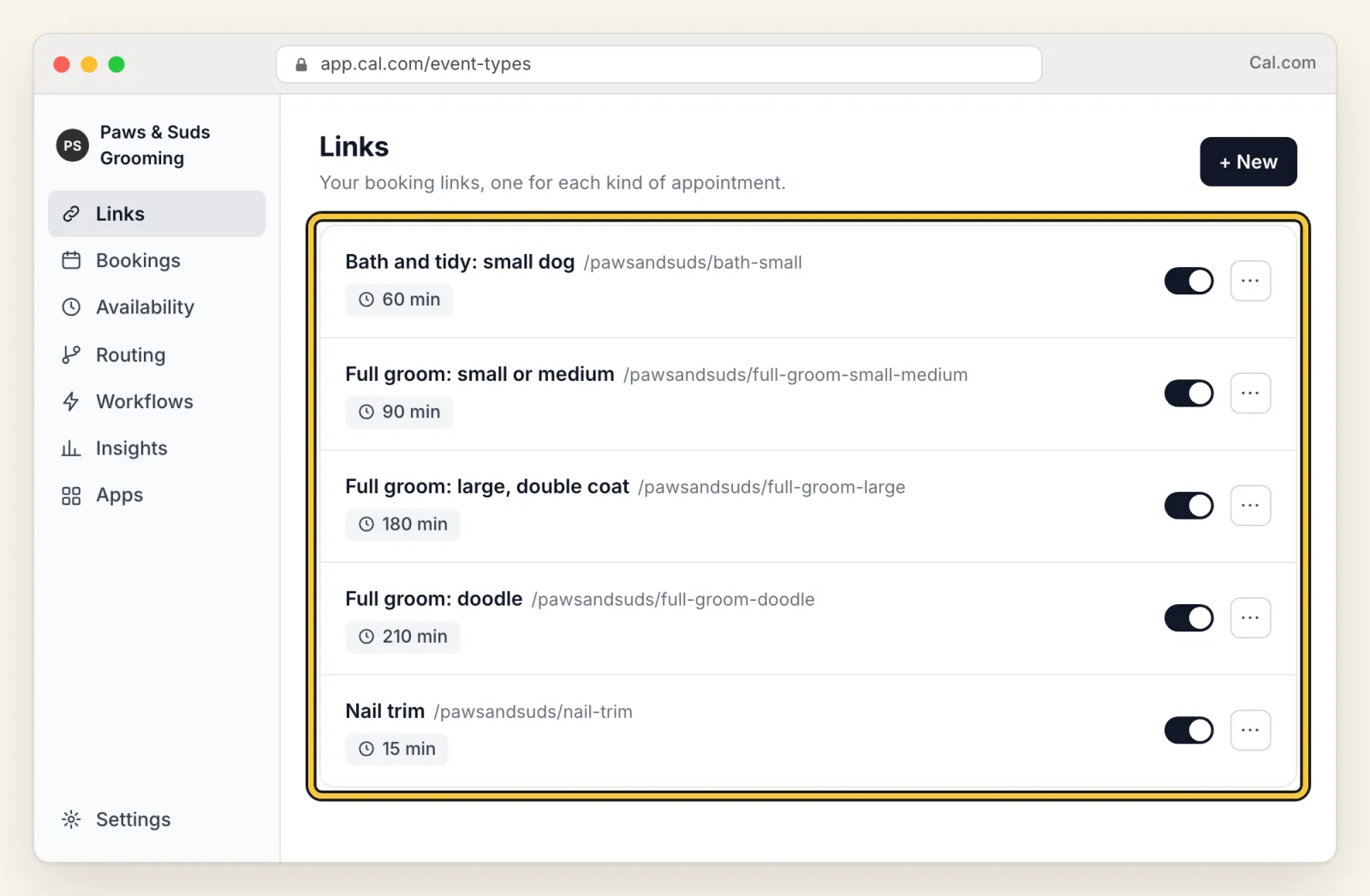
- In Cal.com, click Links in the sidebar (some accounts still call these Event types), then New.
- Give it a title clients will understand, like Full groom: large, double coat.
- Set the duration to how long it really takes you, for example 180 minutes, and click Continue.
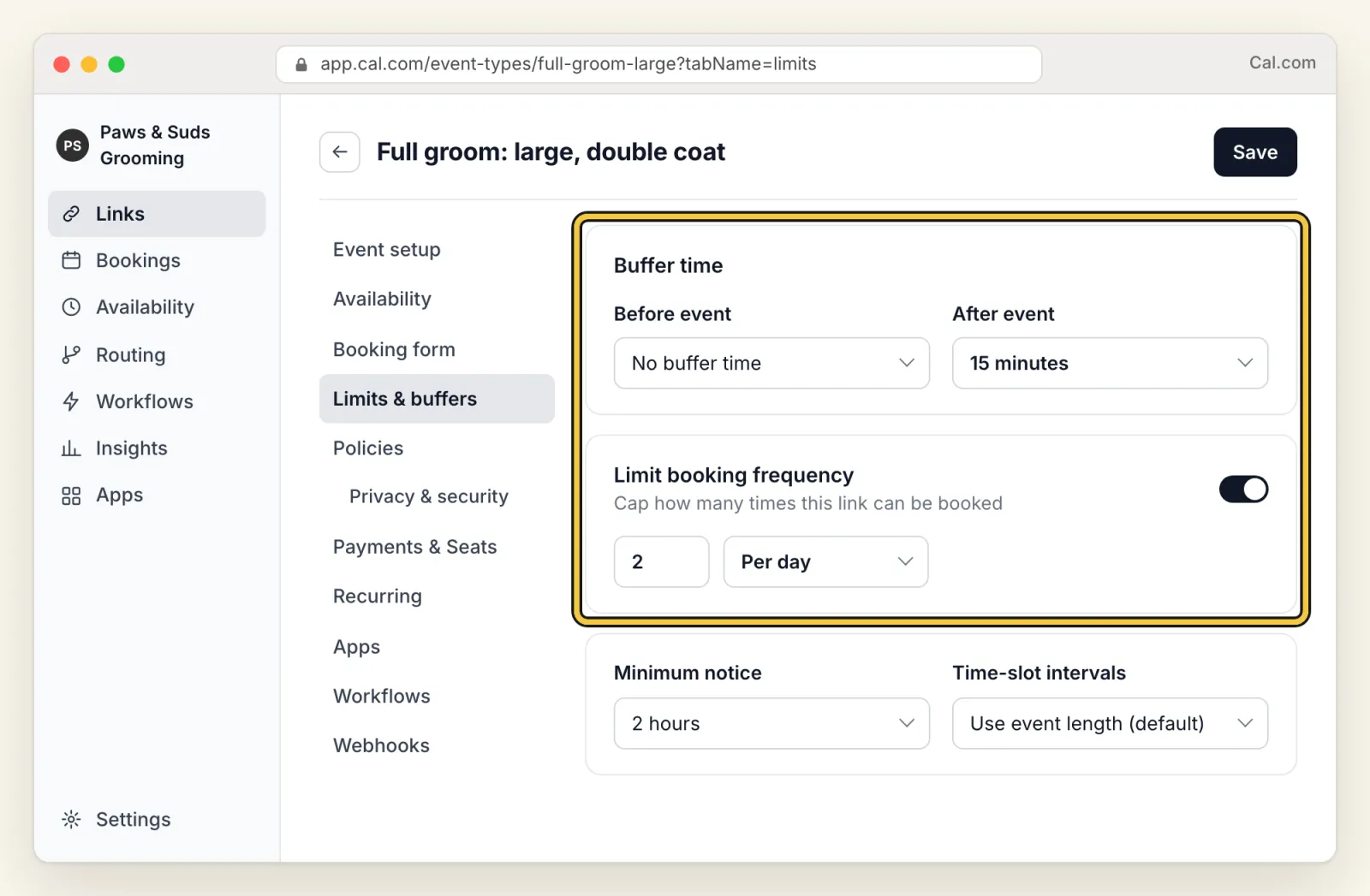
- Open Limits & buffers and set an After event buffer, like 15 minutes, for cleanup between dogs.
- To cap big dogs, turn on Limit booking frequency, say 2 per day.
- Click Save, then repeat for each size and coat you groom.
Copy-paste link names
Bath and tidy: small dog (60 min)
Full groom: small or medium (90 min)
Full groom: large, double coat (180 min)
Full groom: doodle (210 min)
Nail trim (15 min)
The name is the link title and the minutes go in the duration box, not the title. Swap in your own times.
The texts in Step 5 need a phone number, so ask for one:
- Open each link's Booking form (on older layouts it's under Advanced → Booking questions).
- Turn on Phone number and make it required.
- Add a short-text question, Dog's name, and make it required too.
- Add a Checkbox question with your own shop's name in it, like Yes, Paws & Suds can text me when it's time to rebook. Reply STOP any time., and leave it optional. Set its identifier to Text-OK.
Check it works: open your public page in a private window. Each size shows as its own choice, and the long groom only offers times with three free hours.
Does each size show as its own choice, with the long groom only offering times with three free hours?
Step 3: How do I make intake forms, vaccine photos and a matting waiver required before I confirm a booking?
Why it matters: this is the clipboard at the front door, moved online. New clients fill in a Tally form, which then sends them to your booking page, and you only confirm once the form is in.
Build the form:
- Sign up free at tally.so and click Create form. Title it with your shop's name and new client form, like Paws & Suds new client form.
- Type / to add questions: name, phone, email, dog's name, breed, size (Small, Medium, Large, Giant), coat notes, behaviour or health notes, and vet.
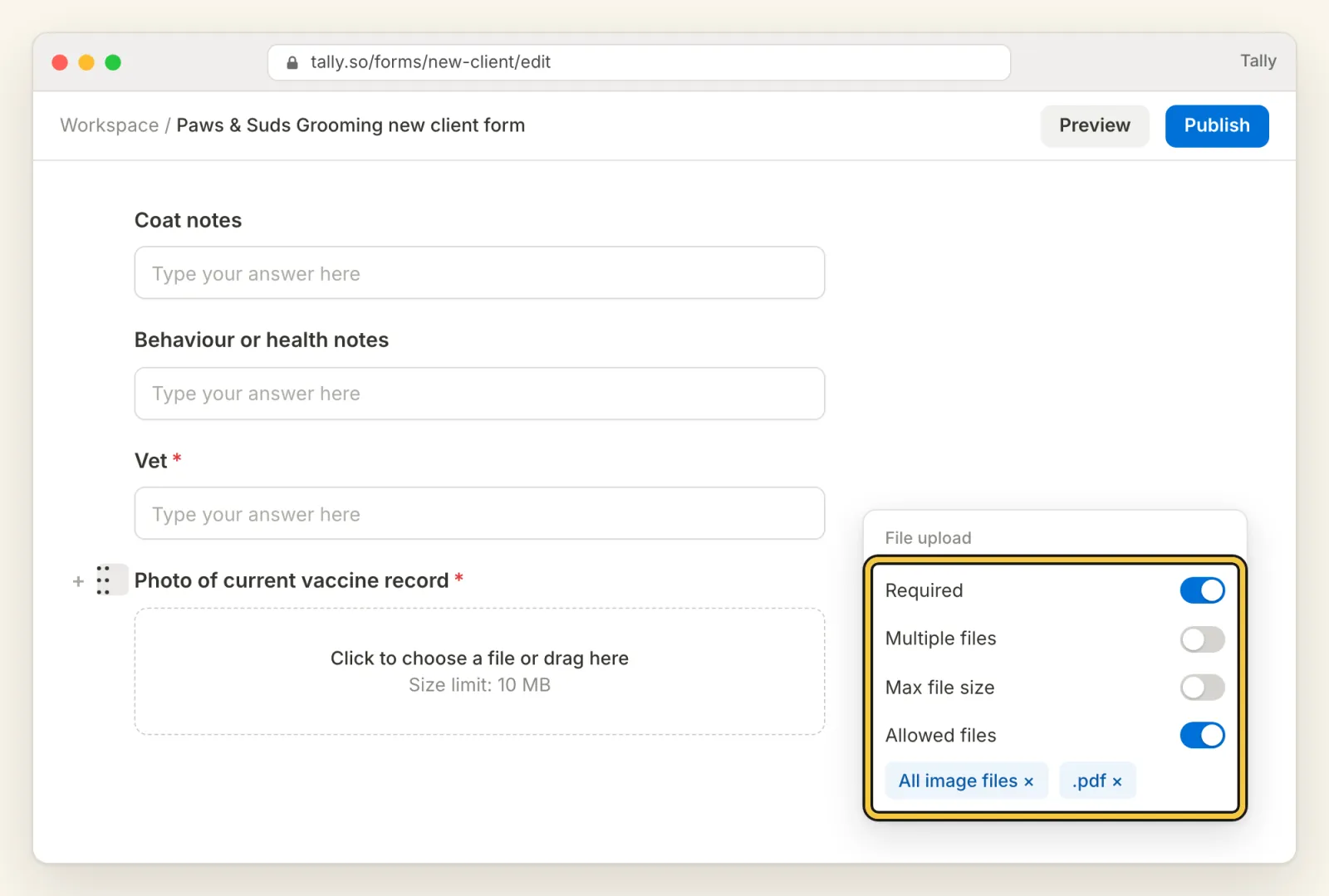
- Type /file to add a file upload called Photo of current vaccine record.
- Click the :: next to it, make it required, and allow images and PDFs. Do the same :: step to make the other key questions required.
Then the matting waiver. Write your own policy and have a lawyer check it. This isn't legal advice.
- Paste your policy below the questions (a starter is below).
- Add a required checkbox, I've read and agree to the policy above.
- Type /signature to add a signature block, and make it required.
Copy-paste starter policy
Matted coats: If your dog arrives matted, I may need to shave short instead of brushing out, for your dog's comfort. Dematting is charged at {{DEMATTING_RATE}}.
Cancellations: Please give at least {{NOTICE_HOURS}} hours' notice. Late cancellations and no-shows may be charged {{LATE_FEE}}.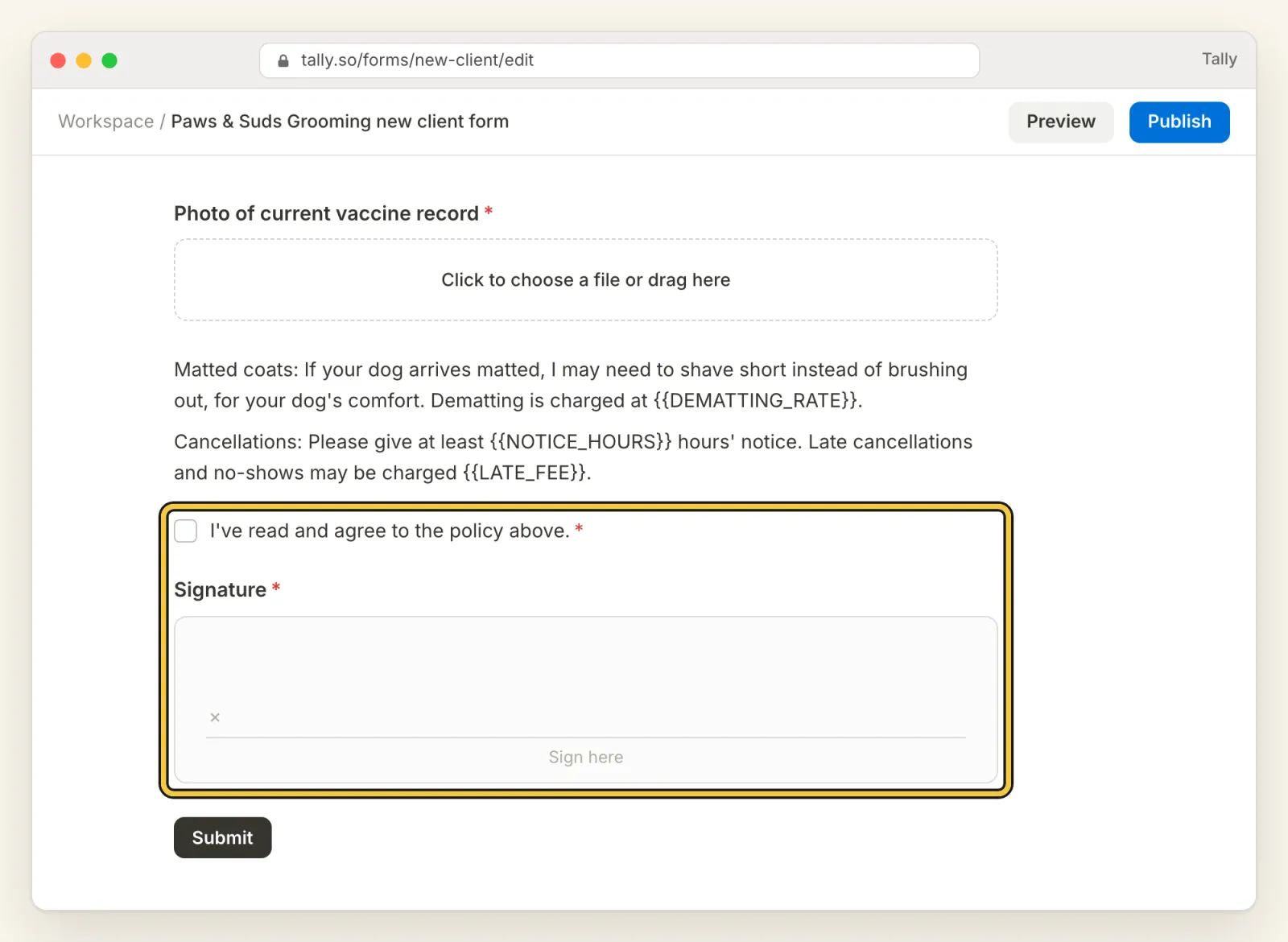
Then point the form at your booking page and your Sheet:
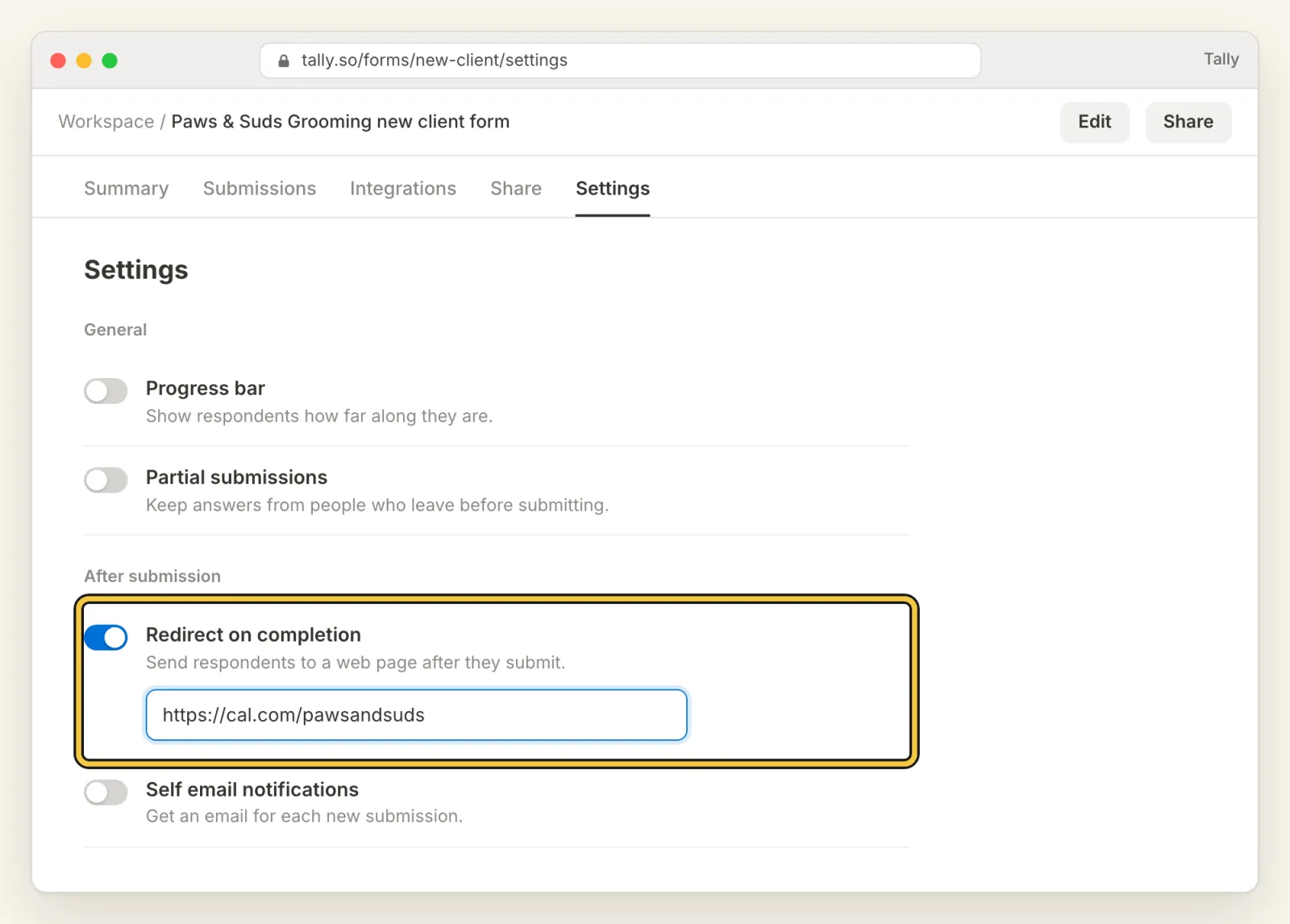
- Open the form's Settings, turn on Redirect on completion, and paste your Cal.com page link (cal.com/ followed by your username).
- Click Publish.
- Open the Integrations tab and click Connect next to Google Sheets.
- First add an empty tab called New client forms to your Clients & pets spreadsheet. Then in Tally choose that spreadsheet and that tab, and click Save changes.
Keep that spreadsheet private. Tally says anyone who can open the Sheet can open the vaccine photos.
Last, hold every booking until you've seen the form:
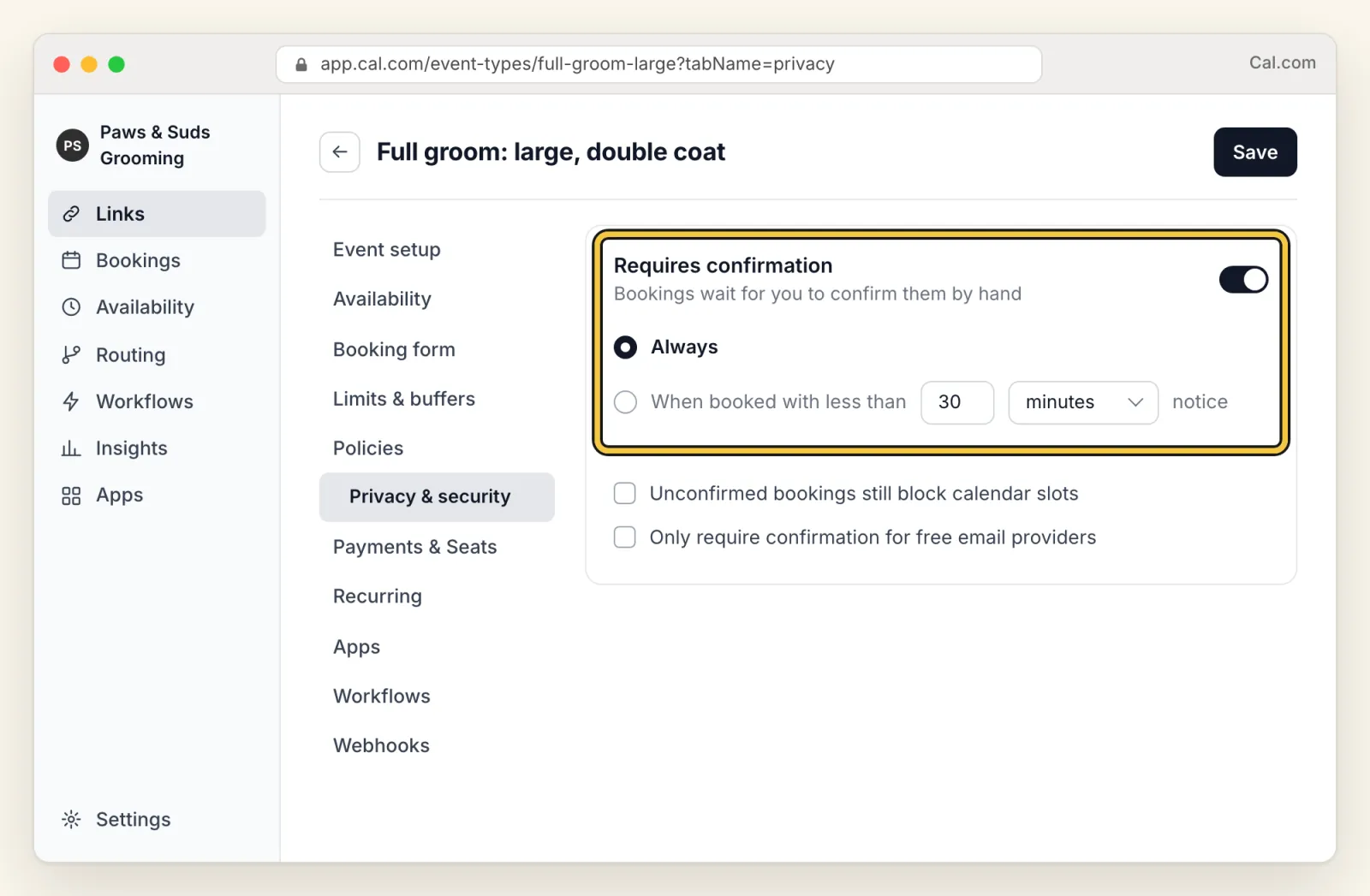
- In Cal.com, open a grooming link and go to Policies → Privacy & security.
- Turn on Requires confirmation, choose Always, and click Save. Do this on each link.
- Requests wait under Bookings → Unconfirmed. Check New client forms for the vaccine photo and signature, then click Confirm.
Regulars with a form on file can book straight from your Cal.com page.
Check it works: fill in the form as "Test Client" with "Biscuit". It shouldn't submit without the photo and signature. When it does, you land on your booking page and the answers appear in New client forms.
Does the form refuse to submit without the photo and signature, then land you on your booking page with the answers in New client forms?
Step 4: How do I turn on online booking with a deposit or card on file?
Why it matters: the booking link answers "do you have Tuesday?" for you, and a deposit or card on file gets people to show up.
Your booking link for new clients is the Tally form link (copy it from Share in Tally). Then the deposit or card:
- In Cal.com, go to Apps, install Stripe, and log in to Stripe or create a free account.
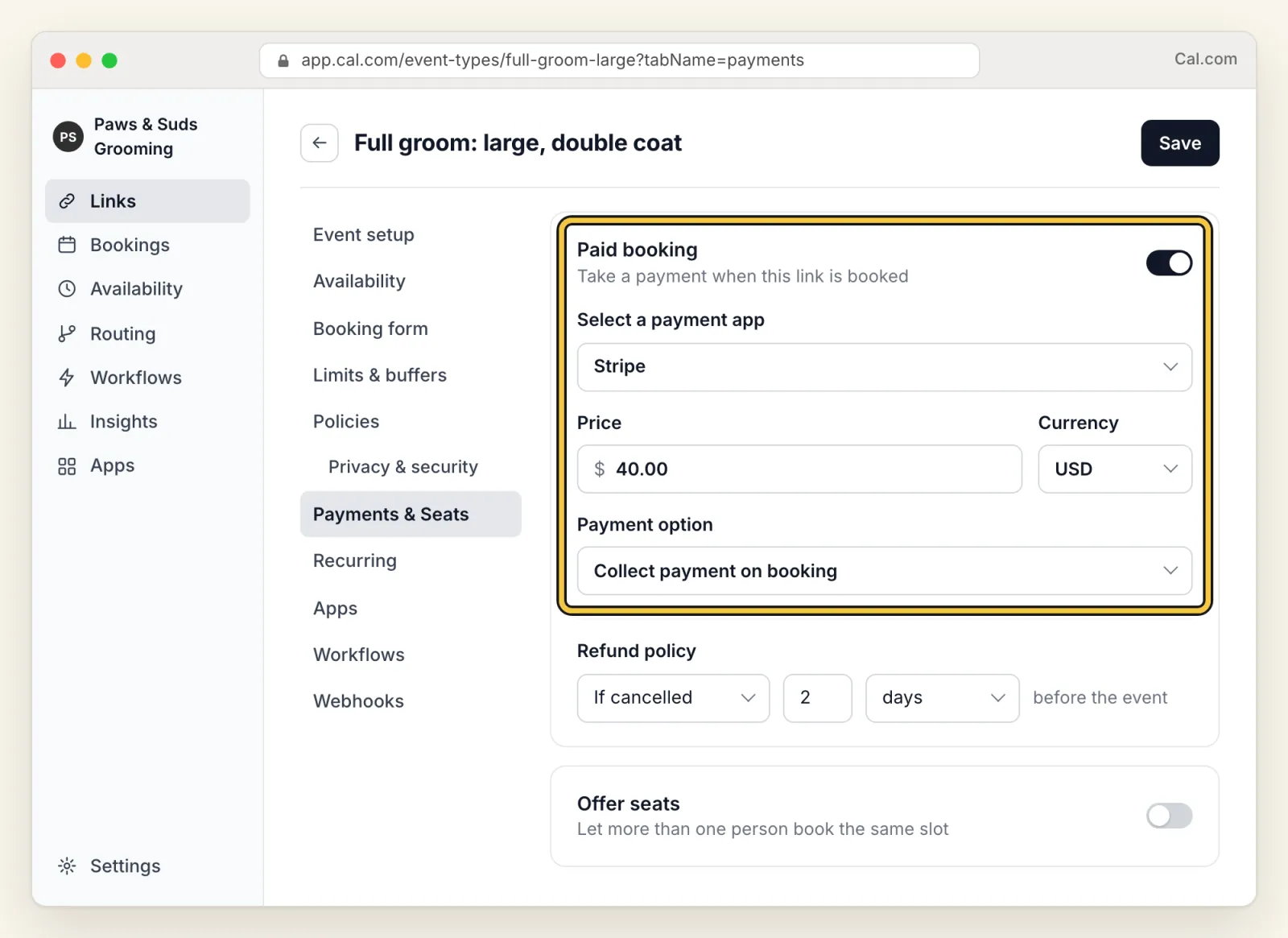
- Open a grooming link, go to Payments & Seats, and turn on Paid booking.
- Choose Stripe, enter the Price and pick your currency.
- Under Payment option, choose Collect payment on booking for a deposit, or Charge no-show fee to save the card and charge it only if they don't show. If you reject a request after they've paid, Cal.com is set up to refund the deposit, but check Stripe the first time it happens.
- Set the Refund policy to If cancelled and enter your notice period.
- Click Save, then repeat for each link.
I'd take 25 to 50% or a card on file, but that's my suggestion. Cal.com takes a dollar amount, so work it out for each size and take the rest at pickup.
Last, send callers to the link. Your voicemail lives with your phone company. On an iPhone:
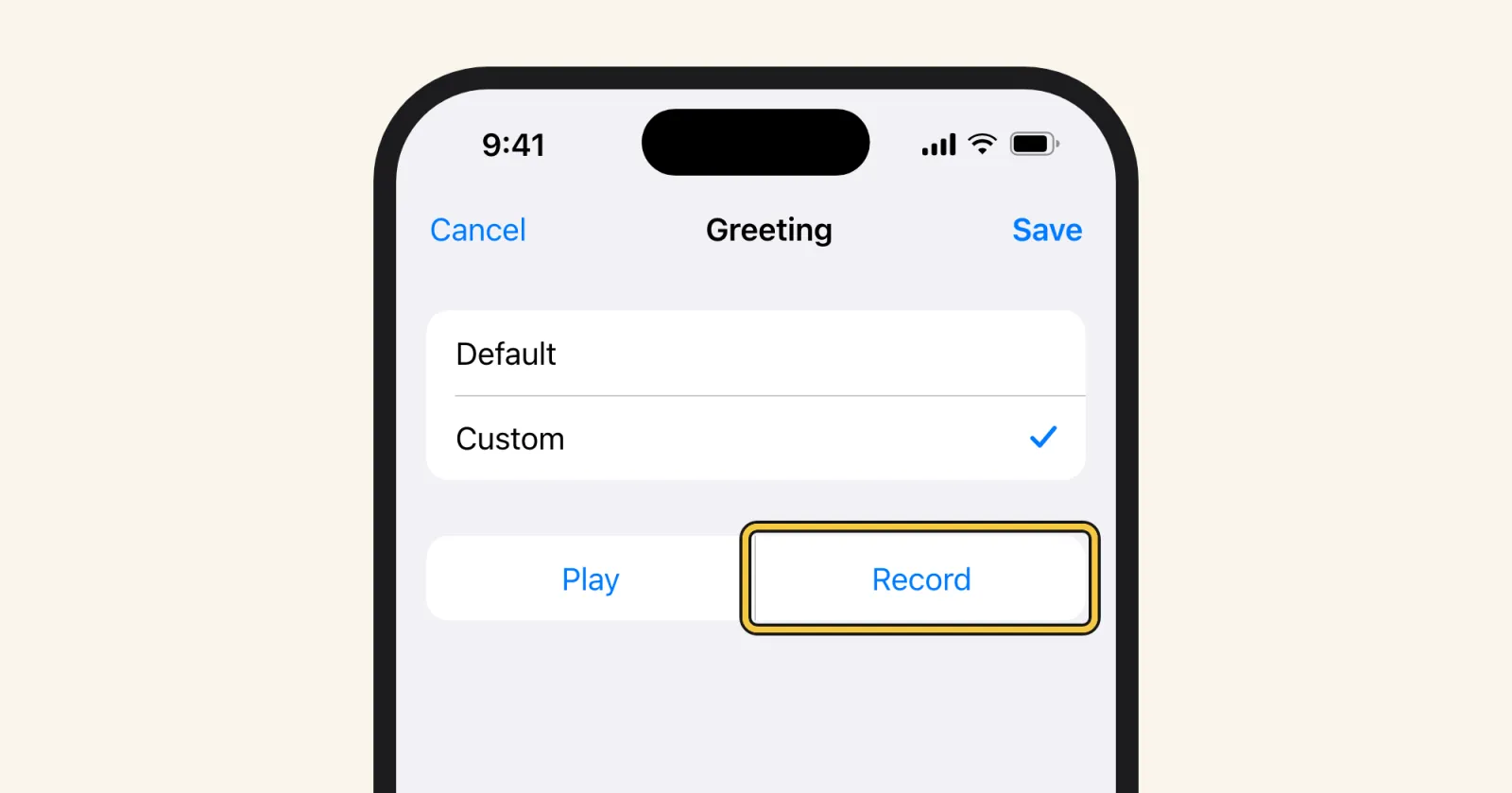
- Open the Phone app and tap Voicemail, then Greeting. (On the newer layout, tap Calls, then Edit, then Edit Voicemail Greeting.)
- Tap Custom, then Record, and read the greeting below.
- Tap Stop, then Save.
Copy-paste text
Hi, you've reached {{SHOP_NAME}}. I'm with a pet right now and can't take your call. You can book or change your appointment any time at {{BOOKING_LINK}}. I'll call you back as soon as I'm free. Thanks!On Android or a landline, use your carrier's voicemail menu. Add the link to your Instagram and Facebook too.
Check it works: call your shop from another phone. Then book yourself through the form, pay the deposit, and refund it in Stripe. Stripe keeps its fee when you refund, so every refunded deposit still costs you that card fee.
Did a test booking take the deposit, and did you refund it in Stripe?
Step 5: How do I send confirmations, reminders and a "ready for pickup" text automatically?
Why it matters: most of your texts say the same three things. Cal.com sends the first two, and a phone shortcut handles the third.
First, buy text credits in Settings → Billing. The free plan comes with none, and when credits run out Cal.com sends an email instead.
The confirmation:
- Click Workflows, then Create, and name it Booking confirmed.
- Set the trigger to When new event is booked, turn on Apply to all, and click Done.
- Change the first step to Send SMS / WhatsApp, send it to the attendee, choose SMS, paste the text below, and click Save.
Copy-paste confirmation
Hi {ATTENDEE_FIRST_NAME}, you're booked at {{SHOP_NAME}} on {EVENT_DATE} at {EVENT_TIME}. Need to change it? {RESCHEDULE_URL} {{SHOP_NAME}}, {{SHOP_PHONE}}. Reply STOP to opt out.Words in single curly brackets are Cal.com's fill-ins. Add them from Add variable so they're spelled right.
The reminders at 72 and 24 hours:
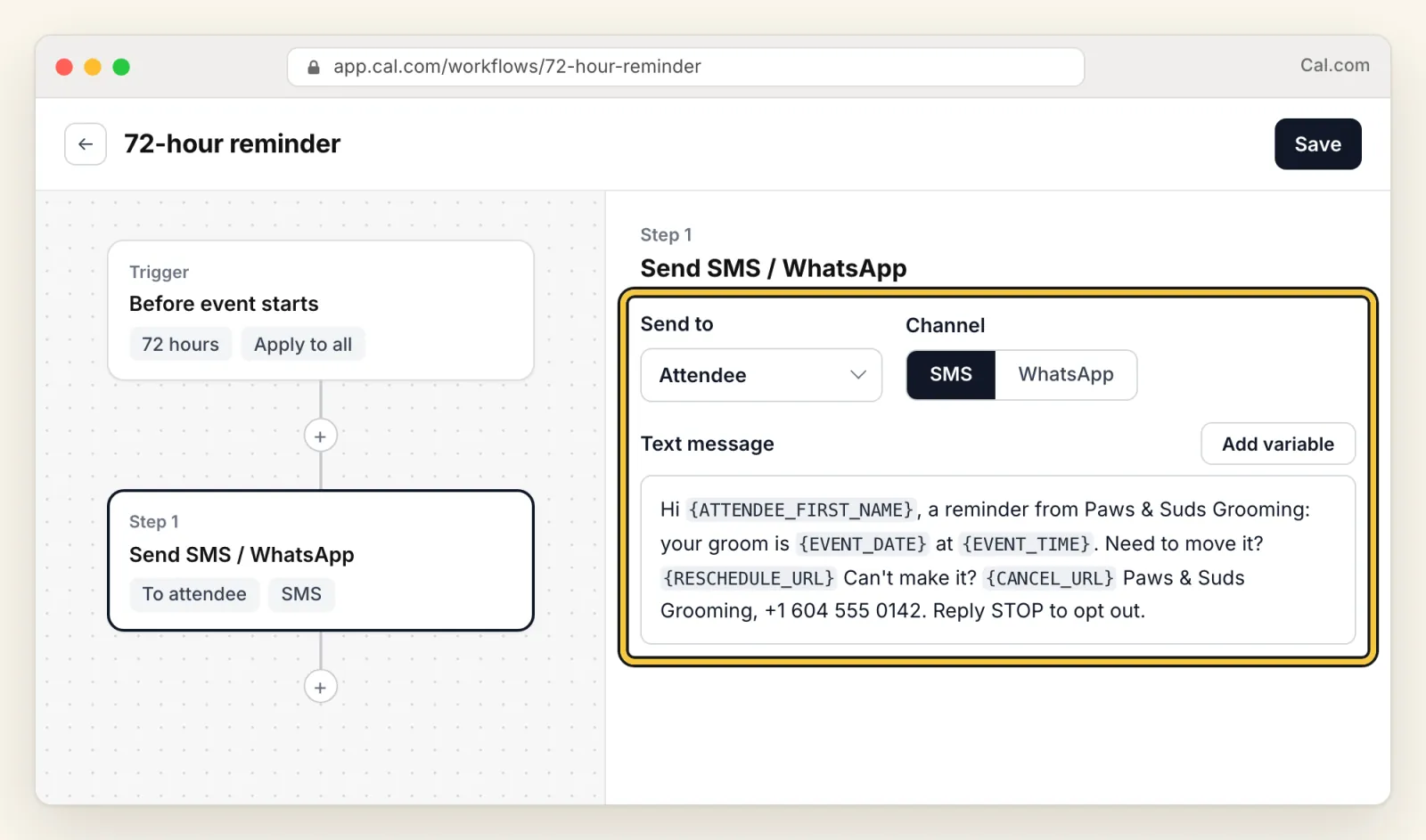
- Create a workflow called 72-hour reminder with the trigger Before event starts, 72 hours, and Apply to all on.
- Make the step Send SMS / WhatsApp, send it to the attendee, choose SMS, paste the text below, and click Save.
- On the Workflows list, click Duplicate, name the copy 24-hour reminder, and change it to 24 hours. Copies start switched off, so turn on Apply to all again and save.
Copy-paste reminder
Hi {ATTENDEE_FIRST_NAME}, a reminder from {{SHOP_NAME}}: your groom is {EVENT_DATE} at {EVENT_TIME}. Need to move it? {RESCHEDULE_URL} Can't make it? {CANCEL_URL} {{SHOP_NAME}}, {{SHOP_PHONE}}. Reply STOP to opt out.The links let them move or cancel without calling you, and the slot reopens on your page.
The one-tap "ready for pickup" comes from your own phone. On an iPhone:
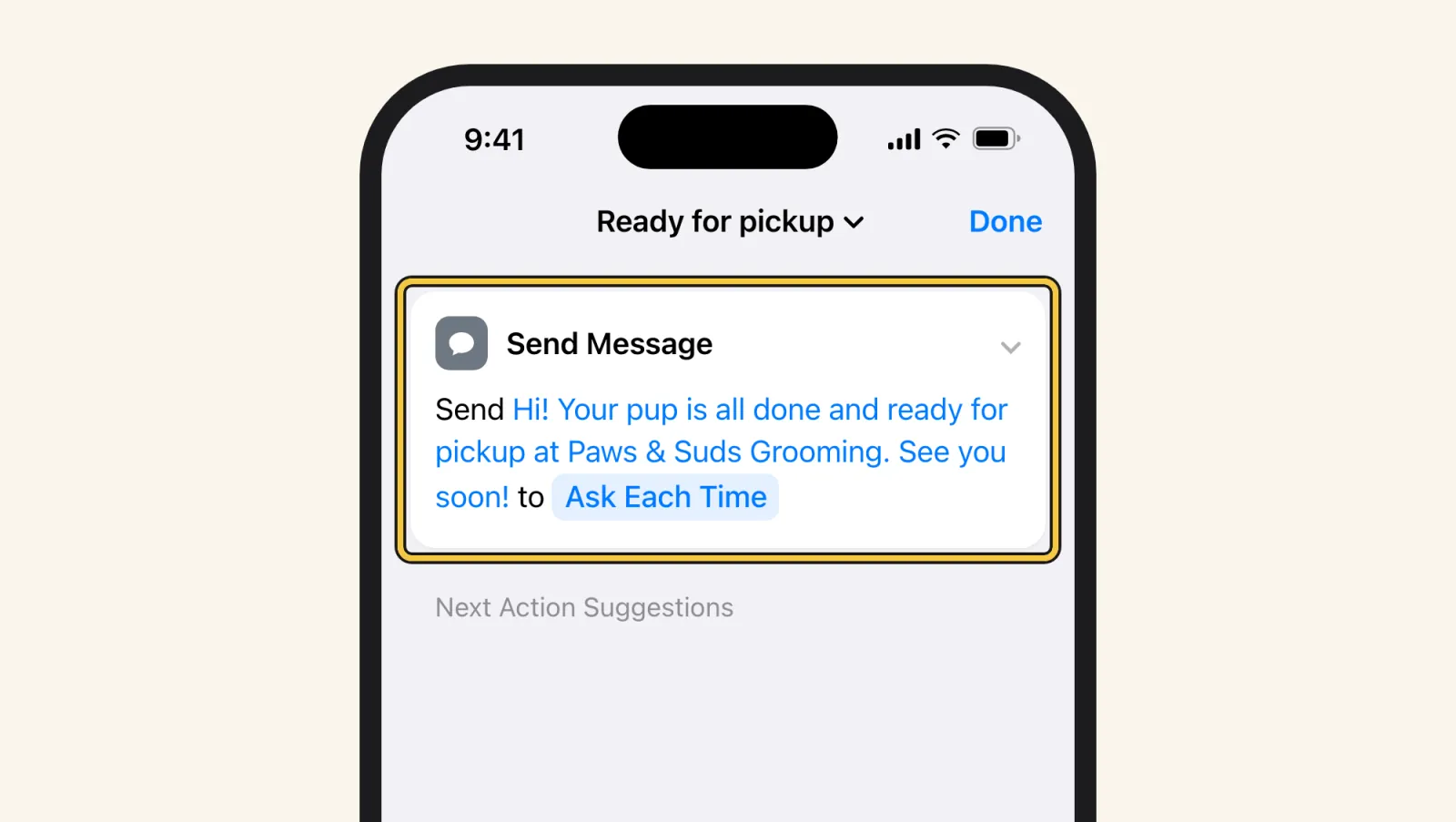
- Open the Shortcuts app and tap +.
- Tap Add Action, search for Send Message, and add it.
- Type the pickup text below in the message. Tap the recipient and choose Ask Each Time, so you pick the client when you run it.
- Name it Ready for pickup and add it to your Home Screen.
Copy-paste pickup text
Hi! Your pup is all done and ready for pickup at {{SHOP_NAME}}. See you soon!On Android, save that text as a quick reply or a text shortcut in your keyboard settings.
Check it works: book a test appointment four days out with your own number and confirm it. The confirmation text should arrive right away, and the reminders follow on their own. Then tap Ready for pickup and send it to yourself.
Did the confirmation text arrive right away, and did Ready for pickup reach your phone?
Step 6: How do I rebook every dog before they leave?
Why it matters: this is the step that actually pays you. It keeps your calendar full without you chasing anyone.
At checkout, book the next visit while they're standing there:
- Open your Cal.com page on your phone, pick their dog's size and a day about six weeks out.
- Hand it to them to fill in their details and the deposit, then confirm it under Unconfirmed.
For anyone who didn't, Make sends a text at six weeks. You need a Twilio number, one more tab in your Sheet and two small Make scenarios.
Start Twilio on day one, because the number can't text until it's registered:
- Sign up at twilio.com and buy a local phone number.
- In the Twilio Console, complete the texting registration. In the US this is called A2P 10DLC. If your business has no tax ID (no EIN, or no Business Number in Canada), you register as a sole proprietor: US$4.50 once, a US$15 review fee, and US$2 a month after that. If it has one, Twilio has you register a Low-Volume Standard brand instead: US$4.50 once, a US$15 review fee, then US$1.50 to US$10 a month depending on the campaign type. Check the current fees on twilio.com before you start. In Canada, texting Canadian clients from a Canadian number, Twilio says A2P 10DLC doesn't apply, but Canadian carriers filter business texts hard, so Twilio suggests a verified toll-free number instead.
Add the Visits tab:
- In your spreadsheet, add a tab called Visits with these headers in A1 to E1: Client name, Email, Phone, Appointment, Start time. Type Text OK in I1.
- Paste the formulas below into F1, G1 and H1. Each one fills its whole column.
- Select column F and click Format → Number → Date.
Copy-paste formulas
F1: ={"Visit date";ARRAYFORMULA(IF(E2:E="","",IFERROR(DATEVALUE(LEFT(E2:E,10)),INT(E2:E))))}
G1: ={"Rebooked";ARRAYFORMULA(IF(B2:B="","",COUNTIFS(B2:B,B2:B,F2:F,">"&F2:F)>0))}
H1: ={"Text today";ARRAYFORMULA(IF(F2:F="","",(F2:F+42=TODAY())*(G2:G=FALSE)=1))}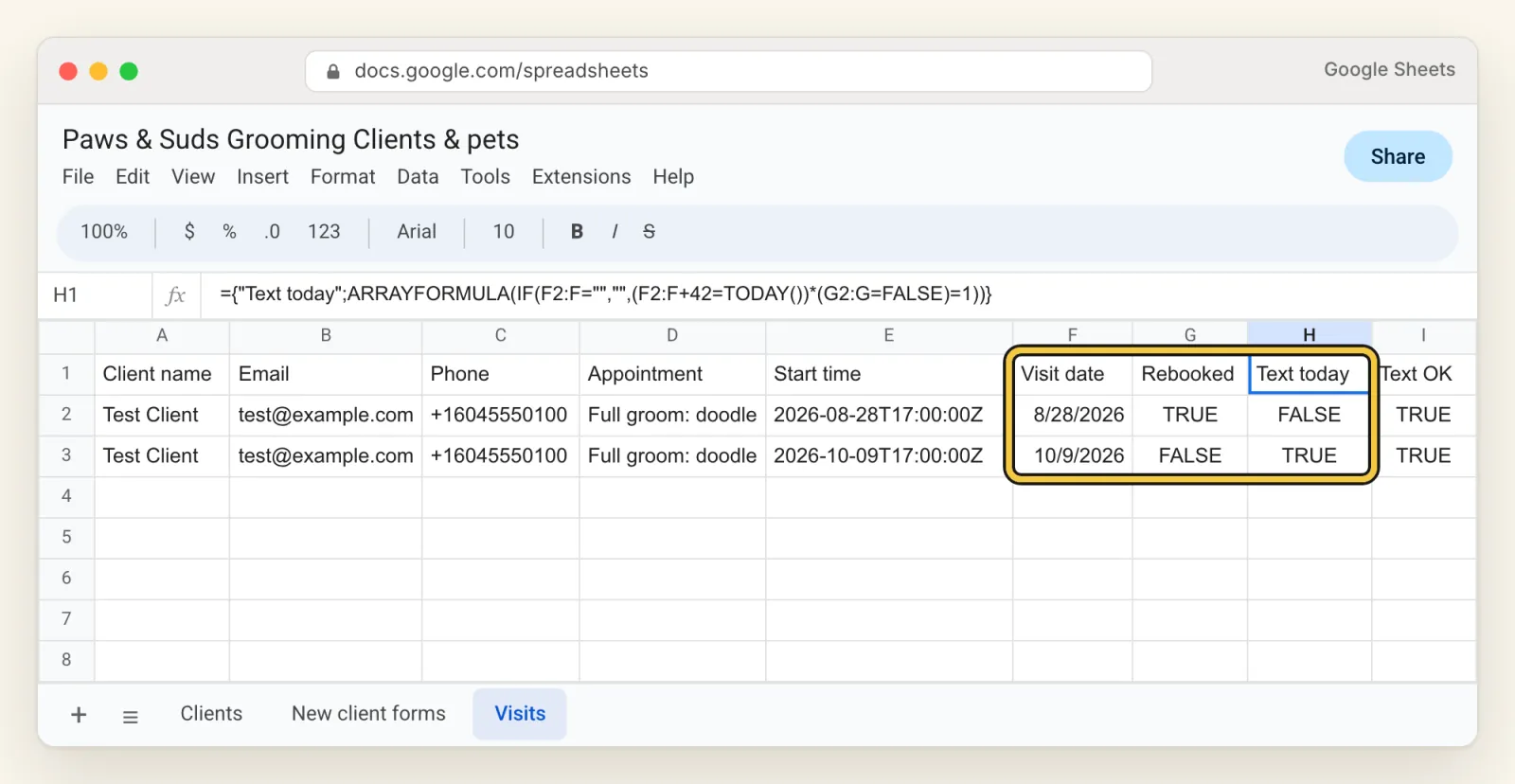
Scenario 1 logs every booking:
- In Cal.com, go to Apps, install Make, and copy the API key it gives you.
- In Make, create a scenario. Add Cal.com → Watch Booking Created, click Create a webhook, then Create a connection, and paste the key.
- Add Google Sheets → Add a Row on the Visits tab, and fill the five columns from the booking's name, email, phone, title and start time. Fill Text OK from the rebook checkbox answer.
- Save it and switch it on.
Scenario 2 sends the text:
- Create another scenario. Add Google Sheets → Search Rows on Visits, filtered to rows where Text today equals TRUE and Text OK equals TRUE, so only people who ticked the box get a text.
- Add Twilio → Create a Message, from your Twilio number to the Phone column, with the text below. Don't type {{CLIENT_NAME}}: map the client's name from the Search Rows result in its place, and paste your real booking link where it says {{BOOKING_LINK}}.
- Schedule it for every day at 10:00, save it and switch it on.
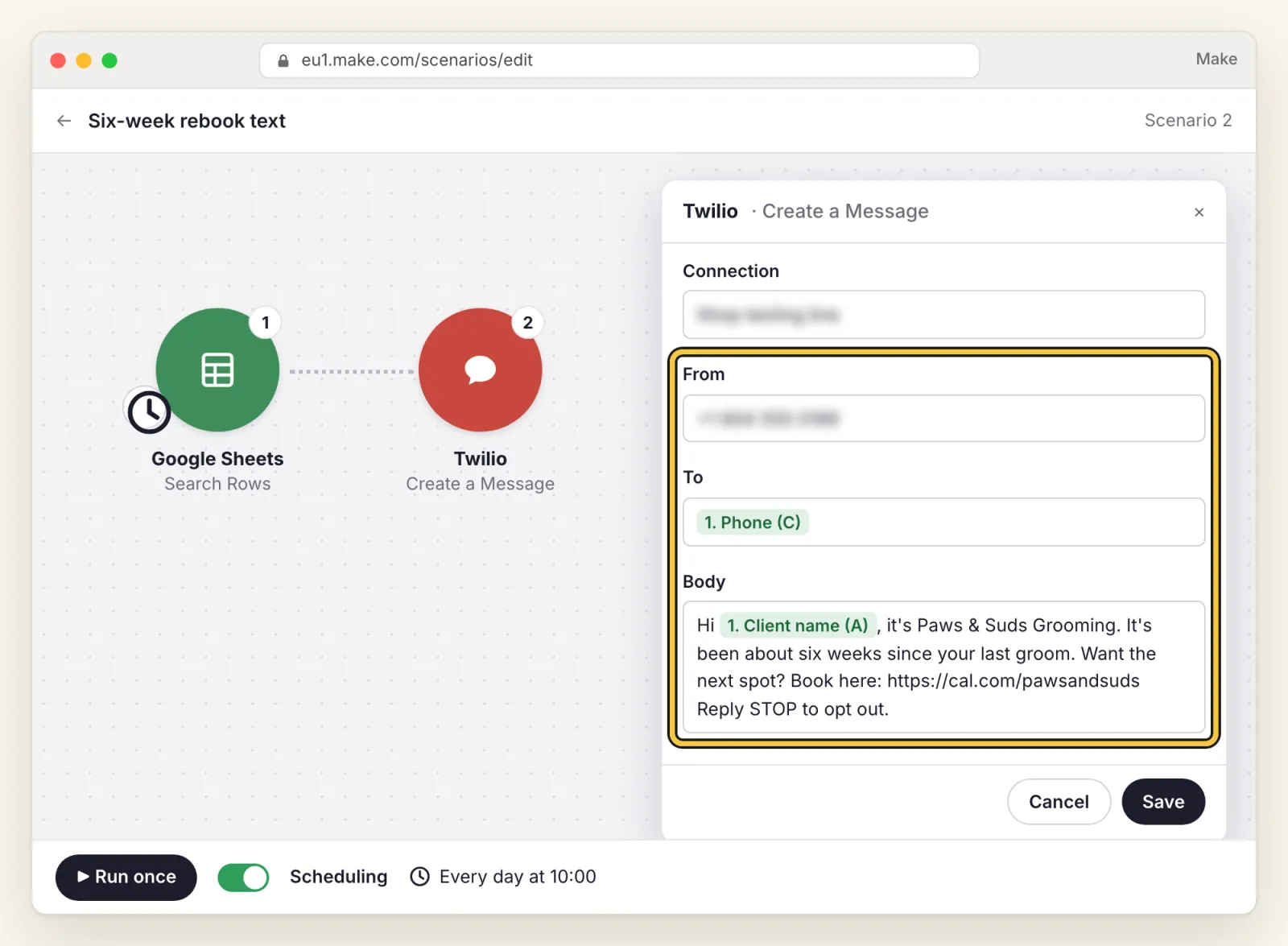
Copy-paste rebook text
Hi {{CLIENT_NAME}}, it's {{SHOP_NAME}}. It's been about six weeks since your last groom. Want the next spot? Book here: {{BOOKING_LINK}} Reply STOP to opt out.Check it works: add a Visits row by hand for "Test Client" with your number, a start time 42 days ago and TRUE in Text OK. Text today should say TRUE. Click Run once on scenario 2, check your phone, then delete the row.
Does Text today say TRUE for the 42-day-old test row, and did running scenario 2 once send you a text?
Would rather an app did it all for you?
MoeGo and Gingr are grooming apps that bundle these steps behind one login, with breed and coat notes built into each pet profile.
MoeGo is US$49 a month for Basic (one team member), US$99 for Growth and US$159 for Ultimate, per van, so ask which automatic texts your plan sends. Gingr sends automatic reminders too, but its help pages only show one reminder text setting per booking type, so ask how you'd send a second one.
| Build it yourself | All-in-one app | |
|---|---|---|
| Monthly cost | About US$3, plus card fees and texts | MoeGo from US$49 |
| Logins | Five (Google, Cal.com, Tally, Make, Twilio) | One |
| Grooming details like breed and coat | Questions you add yourself | Built in |
Swipe sideways to see the whole chart.
If you're solo and don't mind a week of setup, I'd build it yourself. With staff or more than one van, I'd look at the apps first.
Stuck on a step? Book 30 minutes with me and we'll set it up together.
Common mistakes and how to fix them
- The reminder arrived as an email. Your Cal.com text credits ran out. Top them up in Settings → Billing.
- The form won't take the vaccine photo. Free Tally caps files at 10 MB, so ask for a screenshot instead.
- The six-week text never goes out. Twilio hasn't approved your registration yet, scenario 2 is switched off, or the phone number is missing its +1.
- Someone who rebooked still got the six-week text. They booked with a different email, so the Sheet didn't match them. Fix the email in Visits.
- A cancelled appointment still counts as a visit. Scenario 1 only logs new bookings, so delete the row in Visits when someone cancels.
What it costs
| Item | Cost |
|---|---|
| Google Sheets and Calendar | Free with a Google account |
| Cal.com | Free plan; text credits are 1 US cent each, and each text costs Twilio's rate plus 80%, so about 1.5 to 2.5 credits a text by my math |
| Stripe | 2.9% + 30¢ per US card payment; 2.9% + CA$0.30 in Canada; the fee isn't returned when you refund |
| Tally | Free, including file uploads up to 10 MB each and signatures |
| Make | Free plan: 1,000 credits a month, 2 active scenarios |
| Twilio | US$1.15/mo for a US number; US$0.0083 per text plus about half a cent in carrier fees |
| Twilio registration (US, sole proprietor) | US$4.50 once, US$15 review fee, then US$2/mo. With a tax ID (Low-Volume Standard): US$4.50 once, US$15 review fee, then US$1.50 to US$10/mo |
| Typical starting total | About US$3 a month plus a one-time US$19.50 as a US sole proprietor, then card fees and a few cents per text |
By my math a solo groomer stays well under Make's 1,000 free credits. US-dollar prices cost more on a Canadian card.
Smiles,
Brett
FAQ
Is it legal to text grooming clients automatically?
Yes, with permission. In Canada, CASL lets you send a text that confirms a booking someone made without asking for consent first, but that text still needs your business name, a way to reach you and a way to opt out. "Time to rebook" texts are promotional, so they need all of that plus consent (a purchase in the last two years counts as implied consent). In the US, FCC rules say marketing texts sent with automated dialing equipment need the client's written consent first, and an automated rebook text can count, so get it in writing. That's why Step 2 adds a rebook checkbox and the six-week text only goes to people who ticked it. This isn't legal advice.
How much deposit should a dog groomer take?
I'd take 25 to 50% or keep a card on file, but that's my suggestion, not a rule. In Cal.com you set a dollar amount on each booking link.
Can I do this without Make?
Yes. Steps 1 to 5 run with no Make at all. Make only sends the six-week rebook text, and you could send that by hand from the Visits tab instead.